









You've outgrown your spreadsheets. QuickBooks is groaning under the weight of your orders, and you keep hearing that an ERP is the answer. So you go looking for prices, and every vendor page cheerfully says the same thing: "Contact sales." Helpful, right? If you're hunting for the cheapest ERP for small business, that runaround is exactly the problem. The lowest monthly sticker price is almost never the cheapest true cost once you add implementation, migration, add-ons, and features you'll never touch. Here's what we'll do together: break down what an ERP for small business actually costs in plain English, look at the genuinely affordable options, and help you avoid buying more than you need. At Cin7, we spend our days helping product sellers keep costs sane, so we'll be straight with you about pricing, including where a full ERP is overkill.
Key Takeaways
- All-in ERP for a small business typically runs about $20,000 to $200,000 in the first year, and the subscription is only one slice of that.
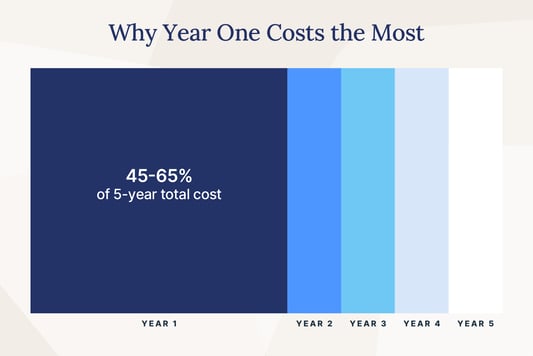
- Year one absorbs the biggest share, roughly 45 to 65 percent of your five-year cost, thanks to implementation, migration, and training.
- The cheapest listed price often isn't the cheapest true cost once add-ons and unused modules pile on.
- Many product-based small businesses don't need a full ERP at all; an affordable "ERP-lite" inventory and order platform can do the job for less.
How Much Does ERP Software Cost for a Small Business?
Let's answer the question you actually came here for. Most small businesses spend roughly $20,000 to $200,000 all-in on an ERP during the first year, depending on how many users you have, which modules you pick, and how much help you need to get set up. Simple cloud setups sit at the low end of that range, while heavier, customized rollouts climb toward the top. Larger enterprises can blow past $1 million, but that's a different world from yours. Notice the phrase "all-in." That monthly sticker price you see (or don't see) is just the software subscription. The real ERP software cost bundles in setup, data migration, training, and the extras that make the thing usable. A handy sanity check: many companies spend about 1 to 3 percent of their annual revenue on ERP. If a quote lands wildly outside that band, it's worth asking why.
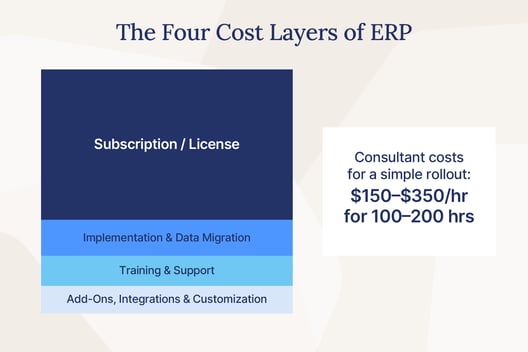
The Four Cost Layers of ERP
When you're sizing up ERP pricing, it helps to picture four separate layers stacked on top of each other. Miss one, and your budget's off from day one. First, the subscription or license. This is the per-user, per-month fee vendors love to advertise, and it's usually the smallest piece of the puzzle. Second, implementation and data migration. Getting your products, customers, and history into the new system is real work, and it's where a lot of the money goes. Third, training and support, so your team can actually run the thing without daily panic. Fourth, add-ons, integrations, and customization, the layer that quietly balloons. Consultants who handle setup and configuration typically charge $150 to $350 per hour, and a simple small business rollout can eat 100 to 200 of those hours. Each third-party integration can run anywhere from $5,000 to $50,000. Add those up and you'll see why the "cheap" $80-a-month plan rarely stays $80 a month. The sticker is the invitation, not the bill.
Why Year One Costs the Most
If you spread ERP costs over five years, the first year is lopsided. Across a typical five-year lifecycle, year one absorbs about 45 to 65 percent of the total cost of ownership. Why so front-loaded? Because implementation, data migration, and training all land right at the start, before you've gotten a single day of value out of the system.
Implementation alone often costs 1 to 3 times your annual software license for small business and mid-market systems. The delivery model matters too. On-premises ERPs can run 30 percent or more higher in total cost than cloud, and it usually carries 18 to 20 percent of the license cost in annual maintenance on top. Cloud and SaaS options tend to bundle support and updates into the subscription, which smooths out the surprises. So when you compare "cheap" options, look past the monthly number and ask what year one really demands.
What Makes ERP Pricing So Confusing
Here's the honest truth: you can't just read ERP pricing off a page, and it's not because vendors enjoy being cagey (well, mostly). The cost genuinely swings on a handful of variables. How many users need access? Which modules do you turn on? How much customization do you want? How many systems need to talk to each other? And who's doing the implementation, an in-house team or a pricey outside partner? Change any one of those and the number moves. That's why so many vendors quote-gate their pricing behind a sales call. They can't print a single figure because your setup and your neighbor's setup produce wildly different totals. Fair enough. But it does leave you squinting at the screen, wondering if you're about to overpay. Then there's add-on creep, the slow drip that turns an affordable ERP into a not-so-affordable one. Per-user fees climb as your team grows. "Cloud access" surcharges appear. None of it looks scary in isolation, but together it reshapes your bill. The fix isn't to give up. It's to know exactly what to look for before you sign.
The Hidden Costs Vendors Don't Advertise
Think of this as your watch-out checklist, the one you can take to any vendor and read aloud. Ask about each item and watch how quickly the "starting price" becomes the "actual price." Heavy customization can add 50 to 200 percent on top of your base license. Industry-specific modules pile on another 10 to 30 percent. Every third-party integration can cost $5,000 to $50,000, and those add up fast if you run several sales channels. Data migration is its own line item, not a freebie. Training pulls your team off their real jobs for days or weeks. None of this means ERP is a bad idea. It means the cheapest ERP for small business is the one with the fewest nasty surprises. This is where we'll put our own cards on the table: at Cin7, our pricing is published, and our 700+ ready-made integrations mean you're not paying five figures to connect the tools you already use. Fewer surprises, fewer invoices you didn't see coming.
The Cheapest ERP Systems for Small Business, Compared
Now for the options. Let's be honest about what "cheapest" even means here, because it covers a lot of ground. On one end you've got free and open-source software, where the license costs nothing but the running costs are very real. On the other you've got affordable paid platforms with predictable monthly fees. Each route has trade-offs, and the "free" one isn't nearly as free as it sounds. Here's the plain-English tour.
Free and Open-Source Options
Open-source ERP is the tempting one, because "free" is a great price. ERPNext, for example, offers its software under a free, open-source license. So far so good. But read the fine print on how you'll actually run it. Hosting starts at around $5 per month for a basic site, managed hosting and support cost more, and implementation is extra, often a lot extra. Free license, paid everything-else. The real cost of open-source shows up in the running: you'll need hosting, developer time to configure and maintain it, and someone to call when something breaks at 2 a.m. If you've got technical chops in-house, that can be a genuinely low-cost route. Other open-source names get mentioned in the same breath, and they follow the same pattern: the code is free, but your time and expertise are not. If you don't have a developer on speed dial, factor that gap into the math before you fall for the zero on the license line.
Affordable Paid Platforms
If a monthly fee with support included sounds more like your speed, there are solid affordable entry points, as long as you know what each one actually is. Microsoft Dynamics 365 Business Central lands at $80 to $110 per user, per month, and it's a more complete business platform, though the per-user model means costs grow with your team. QuickBooks Enterprise runs roughly $1,873 to $5,364 per year depending on the tier, but it's accounting-first, not a full operations ERP, so inventory and order workflows aren't its main event. See the pattern? "Affordable" and "full ERP" don't always describe the same product. Some of these are excellent at one job and simply weren't built to be your everything system. That's not a knock. It just means you have to match the tool to the work, which is exactly what the next sections are about.
Affordable ERP Price Comparison (At a Glance)
Here's the quick-scan version so you can compare apples to apples. Prices are starting points and scope varies, so read the "What It Is" column as carefully as the price.
| Platform | Starting Price | What It Is | Best-Fit SMB |
|---|---|---|---|
| ERPNext | Free license; hosting from ~$5/mo, managed hosting + implementation extra | Open-source ERP | Tech-savvy teams comfortable self-hosting |
| Microsoft Dynamics 365 Business Central | $80–$110/user/mo | Broader business management platform | Teams wanting a fuller suite, priced per user |
| QuickBooks Enterprise | ~$1,873–$5,364/yr | Accounting-first software (not a full ops ERP) | Businesses centered on accounting needs |
| Cin7 | From $349/mo (5 users, 700+ integrations) | Inventory and order management ("ERP lite") | Product sellers wanting connected, affordable operations |
"Cheapest" Isn't Always Cheapest: Total Cost of Ownership
Here's the idea that changes how you should shop. The cheapest ERP on paper can turn into the most expensive one in practice, and it happens in two very different ways. The first is overbuying, when you pay for a big, complex ERP and use a fraction of it. The second is doing nothing, when you stay on spreadsheets and manual work while the hidden costs quietly stack up. Both feel like the "safe," money-saving choice in the moment. Both can cost you far more than a right-sized system would. Let's look at each so you can spot the trap before you fall in.
The Cost of Overbuying
A low per-user price on an over-scoped system is a false economy, and the math backs that up. When you buy a heavyweight ERP you don't fully need, you pay for modules that gather dust, you sit through a long and pricey implementation, and you take on real risk. Between 45 and 64 percent of ERP projects exceed their original budget, with average overruns of 25 to 40 percent. Worth noting: the most-quoted big benchmark, a median project cost around $450,000 over a 15.5-month timeline with 78.6 percent choosing cloud, comes from that same Panorama Consulting survey of mid-market organizations with a median of roughly $200 million in revenue. That's not you, and treating those numbers as your baseline is how small businesses talk themselves into overbuying. The pattern is real, though. Cin7 customer Lofta came to us after an ERP failure, one of many product sellers who found a right-sized fit after a heavier system stalled out instead of paying off. Bigger isn't safer. Right-sized is safer.
The Cost of Doing Nothing
Now the other trap, because staying put isn't free either. Spreadsheets feel cheap until you count what they cost. Research by Prof. Raymond Panko of the University of Hawaii found that 94 percent of operational spreadsheets contain errors, and even careful experts slip up in a small portion of formula cells. When those errors drive your stock decisions, the bill shows up as bad orders and lost sales. Inventory carrying costs alone run about 20 to 30 percent of your inventory value every year, so every unit sitting in the wrong place is quietly draining cash. Zoom out and the scale is staggering: IHL Group estimated that inventory distortion, meaning out-of-stocks and overstocks combined, cost retailers roughly $1.77 trillion in 2023. Manual work also eats hours your team could spend on customers, and it causes the stockouts that send shoppers to a competitor. "We'll fix it later" is a price too, and it compounds. The question isn't whether doing nothing costs money. It's whether you can see the invoice.
Do You Actually Need a Full ERP?
Time for the question no ERP salesperson will ask you, because they're all selling ERP: do you actually need one? For a lot of product-based small businesses, the honest answer is no. What you really need is connected inventory, orders, purchasing, and clean accounting sync across your channels. What a full ERP adds on top, heavyweight manufacturing planning, HR suites, deep finance modules, is often more than your business will use for years. Paying for all of it just to get solid inventory and order management is like buying a cargo ship to cross a pond. That's where ERP-lite comes in. It's the slice of ERP capabilities most product sellers actually need, delivered at a fraction of the cost and complexity of the full thing. You get real-time stock visibility, automated ordering, and your sales channels and accounting all talking to each other, without the multi-month, six-figure implementation. For many small businesses, that's not a compromise. It's simply the right-sized tool for the job you're actually doing. So before you price out a full ERP, it's worth asking whether a leaner, cheaper system would cover your must-haves with room to grow.
When ERP-Lite Is Enough (and How Cin7 Fits)
This is our home turf, so let's be clear about what we are and aren't. Cin7 is an inventory management system, an "ERP for small business" or "ERP lite," not a full ERP, and that's the whole point. We connect your sales channels, warehouses, and accounting so everything stays on the same page, with 700+ integrations and AI-driven demand forecasting doing the heavy lifting. You keep the QuickBooks or Xero you already use instead of ripping out your finance stack for a monolith. And our pricing is published and predictable, starting from $349 per month for five users, so you're not stuck guessing at a "contact sales" number. What does right-sizing actually buy you? Cin7 customer Peta + Jain, a vegan fashion and apparel brand, saved roughly $130,000 a year in labor and processing costs after automating their order management with us. That's a self-reported result, not an independently audited one, but it lines up with the core idea here: when the tool matches the job, the savings show up in the work, not just the sticker price. If your must-haves are inventory, orders, and channel sync, ERP-lite may be all the ERP you ever need.
How to Choose an Affordable ERP Without Regret
Let's turn all of this into a plan you can actually use. Choosing an affordable ERP comes down to five moves, and none of them involve staring at a "starting from" price. First, right-size to your real needs. Write down your must-haves (say, inventory, orders, accounting sync) and your nice-to-haves, then be honest about which is which. Second, total the true cost across all four layers, not just the subscription. Add subscription, implementation, training, and add-ons, then compare those full numbers vendor to vendor. Third, prioritize the integrations you already rely on. If a system connects natively to your accounting software and sales channels, you dodge those $5,000-to-$50,000 integration bills. Fourth, ask the cost-driver questions out loud: How much per extra user? Which modules cost more? What does data migration run? How much do renewals go up? Get it in writing. Fifth, favor cloud plus transparent, published pricing. It won't just save you money, it'll save you the sinking feeling of a surprise invoice. Do these five things and you'll buy with your eyes open, which is the only way to buy without regret. The cheapest option is the one you understood completely before you signed.
Frequently Asked Questions
How Much Does ERP Software Cost for a Small Business?
Most small businesses spend roughly $20,000 to $200,000 all-in in the first year, covering software, implementation, migration, and training. Remember the difference between the sticker price and the total: the monthly subscription is usually the smallest of the four cost layers. Total all four before you compare options.
What Is the Cheapest ERP for Small Business?
On license alone, free and open-source software like ERPNext is the cheapest, but hosting, developer time, and implementation make the true cost climb. Affordable paid entry points include Cin7 (from $349 per month), while broader suites like Microsoft Dynamics 365 Business Central are priced per user. The cheapest true cost is whichever one fits your needs without extras you won't use.
Is There a Free ERP for Small Business?
Yes, open-source options carry a free software license. The catch is that hosting (from around $5 per month), implementation, developer time, and ongoing support are the real costs. "Free" describes the code, not the whole bill.
Do Small Businesses Really Need an ERP?
Often, no full ERP is needed. Many product-based small businesses do just fine with a connected inventory and order platform, sometimes called "ERP-lite," that syncs their channels and accounting. That covers the essential work at a fraction of a full ERP's cost and complexity.
How Long Does ERP Implementation Take for a Small Business?
Cloud setups for small businesses often take about 2 to 6 months. The 15.5-month median you may have read comes from Panorama Consulting's survey of mid-market organizations (median revenue around $200 million), not small businesses, so don't use it as your yardstick.
Conclusion: Spend Smart, Not Just Small
Here's the takeaway to carry with you: the cheapest ERP for small business isn't the one with the lowest monthly price. It's the one that fits your business and your true budget. Total the real cost across all four layers, right-size to what you actually need, and refuse to pay for shelfware you'll never open. Do that, and "affordable" stops being a gamble and starts being a smart, deliberate choice. If a connected, affordable inventory and order platform sounds like the right size for your business, we'd love to show you how it works. Request a demo and let's find the setup that fits.
More from the blog
View All Posts
10 Best Manufacturing ERP Software for 2025
Read More
ERP for E-Commerce: Why ERP Lite Is the Smarter Path to Growth
Read More