










QuickBooks keeps your books tidy. But somewhere along the way, your stock levels, purchase orders, and multichannel orders quietly outgrew it, and now you're hunting for inventory software for QuickBooks that works with it instead of fighting against it. Good news: that's exactly the right instinct. The smartest setup doesn't replace QuickBooks at all. It keeps QuickBooks as your accounting book of record and adds a dedicated system to run the operational heavy lifting, so your financials and your warehouse finally speak the same language.
We'll walk you through what QuickBooks inventory management actually does (and where it taps out), how the integration really works depending on whether you're on QuickBooks Online or Desktop, a practical way to choose, how to set it up without wrecking your books, and the kinds of tools worth a look. No jargon, no fear-mongering, just a clear path. Because your books shouldn't be the thing standing between you and your next thousand orders.
Short answer: the best inventory software for QuickBooks is a dedicated inventory management system (IMS) that syncs two ways with QuickBooks Online or Desktop. QuickBooks keeps your books, and the IMS runs stock, orders, warehouses, and production. Which one fits depends on your channels, locations, and whether you manufacture.
Key Takeaways
- QuickBooks Online Plus and Advanced track basic stock, but not multi-warehouse inventory, barcode picking, multi-level BOMs, or forecasting.
- In QuickBooks Online, barcode scanning, multi-location stock, and AI forecasting usually mean adding an IMS.
- The best setup keeps QuickBooks as your accounting system of record and adds a dedicated inventory management system (IMS).
- QuickBooks Online syncs through an API in near-real-time; Desktop uses the local Web Connector, scheduled or on demand.
- Match the tool to your business type (retail, e-commerce, wholesale, or manufacturing), and always confirm what data actually syncs.
- Cin7 connects natively to QuickBooks Online (here's what's new in the integration).
What QuickBooks Does for Inventory (and Where It Stops)
QuickBooks handles more inventory than people expect, and less than growing businesses need. Knowing exactly where that line sits is the whole game, so let's set an honest baseline before we talk about adding anything.
What QuickBooks Online Tracks Natively
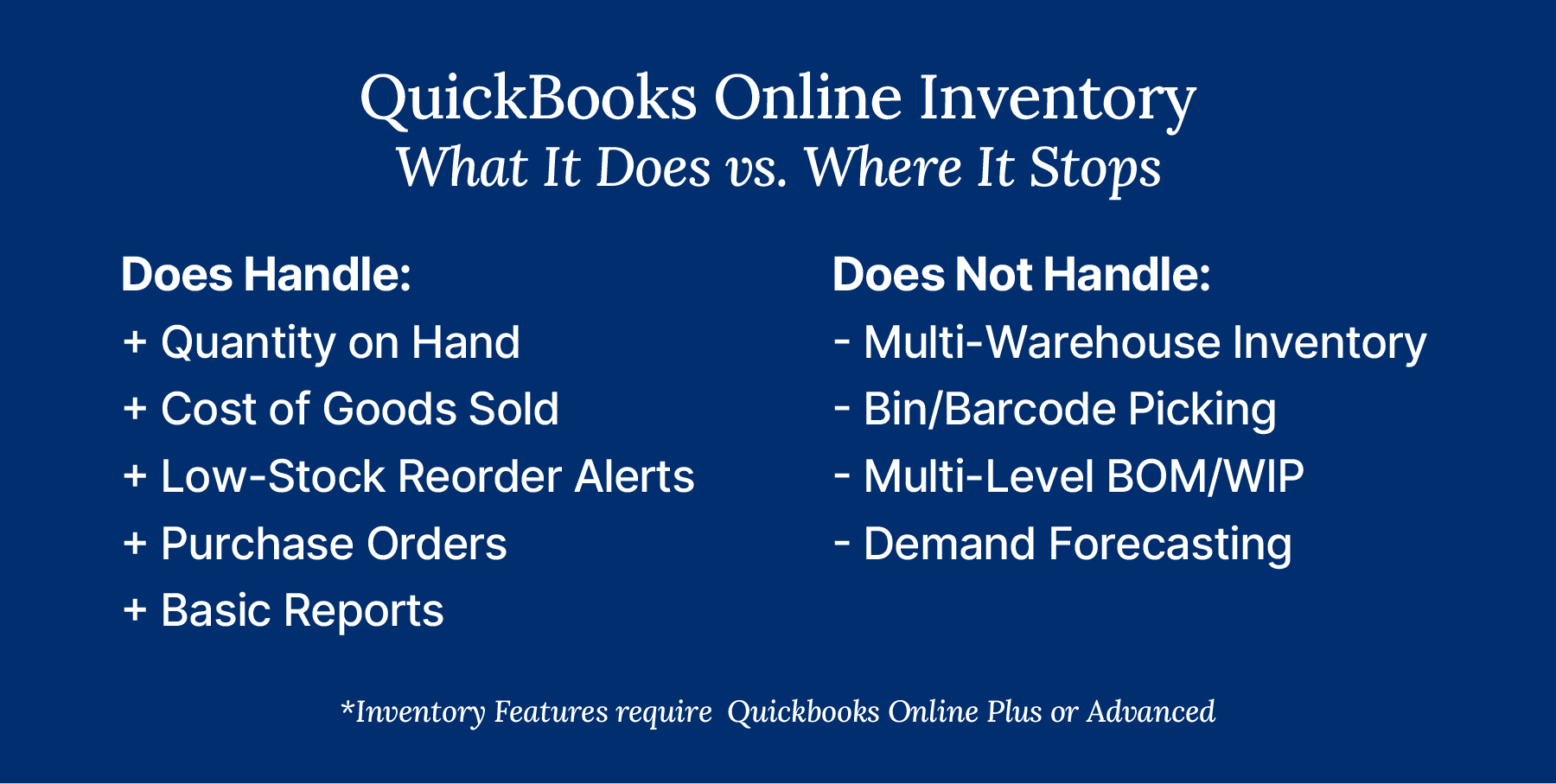
QuickBooks Online can track inventory, but only on the right plan. On QuickBooks Online Plus and Advanced, you can track quantity on hand, record cost of goods sold, set low-stock reorder alerts, create purchase orders, and run basic inventory reports. Costing defaults to FIFO, or you can pick Moving Average Cost instead, so choose carefully because you can't switch later. That's a genuinely useful toolkit for a single location with a tidy catalog, and for a lot of early-stage sellers it's plenty.
The catch is that these features aren't included on Simple Start or Essentials. If you're on one of those plans and wondering why you can't find inventory tracking, that's why: you'd need to upgrade to Plus or Advanced, or buy Intuit's inventory add-on (about $40 a month in 2026, so check current pricing). It's an easy trap to fall into, since the plan names don't exactly shout "inventory lives here." Once you're on the right plan, go to Settings, then Account and settings, then Sales. Select Edit in Products and services, and turn on Track quantity and price/rate and Track inventory quantity on hand (Intuit's setup guide has the full steps). So the honest read is this. For QuickBooks inventory management at a small scale, one location, a manageable number of SKUs, and no manufacturing, QuickBooks Online does the core job. It counts what you have, tells you what it cost, and nudges you when you're running low. The trouble starts when your operation gets more interesting than that.
Where QuickBooks Runs Out of Room
QuickBooks Online runs out of room the moment your operation stops being simple, and the gaps are specific. First, as of late 2026, QuickBooks Online's location tracking categorizes transactions for reporting, and it isn't per-warehouse stock management.
The "tracked locations" feature on Plus caps at 40 combined classes and locations, and Advanced lifts that limit. Either way, they won't tell you how many units sit in your Texas warehouse versus your 3PL. Intuit's multi-location inventory guide says location tags don't track item quantities and places per-location stock in Intuit Enterprise Suite, a separate product.
| ncluded in Plus and Advanced, or a paid add-on for Simple Start and Essentials | Enterprise Platinum and Diamond only | Its own subscription, connected to QuickBooks | |
| Multi-warehouse stock | Location tags label transactions but don't track quantities. Intuit documents per-location stock for Intuit Enterprise Suite | Yes, multiple inventory sites with transfers | Yes, across multiple warehouses and 3PLs |
| Bin and barcode | Not in Intuit's inventory docs, so most teams add an app | Yes, bin tracking and barcode scanning (scanners sold separately) | Yes, bin locations and barcode scanning |
| Multi-level BOM/WIP | Bundles (items sold together as one), but multi-level BOMs aren't in Intuit's QBO inventory docs | Not in the Advanced Inventory feature list | Yes, multi-level BOMs and assemblies |
| Demand forecasting | Not in Intuit's QBO inventory docs | Not in the Advanced Inventory feature list | Yes, AI-driven forecasting |
| Multichannel sync | Through connected apps | Through connected apps and the Web Connector | Built in (Cin7 has 700+ integrations) |
| Lot/serial tracking | Not documented in Intuit's QBO inventory help, so confirm before you buy | Yes, serial or lot numbers | Yes, with full unit history kept in the IMS |
| Sync method | Apps connect through Intuit's API (OAuth 2.0) in near-real-time | Web Connector, on a schedule or on demand | Posts sales, purchases, and costs to QuickBooks |
When to Move Beyond QuickBooks' Native Inventory
You've outgrown QuickBooks' native inventory when your counts can't keep up with your order volume, and there's a well-established framework for spotting that moment. The Association for Supply Chain Management (ASCM) draws a clean line between periodic and perpetual inventory. Periodic systems, where you count stock manually at set intervals, suit organizations with small amounts of inventory. Perpetual systems, which track inventory automatically and near-real-time, are what ASCM describes as best suited to organizations with higher inventory levels, though it notes they need specialized equipment and software. ASCM frames inventory control as the activities, systems, and procedures used to optimize inventory levels, and calls it critical to preventing overages, obsolescence, spoilage, waste, stockouts, and disappointed customers. That's a tidy summary of everything that goes sideways when you wait too long.
So how do you know it's time? Here's the practitioner's checklist we use. You're ready to graduate when you hit any of these:
- You've opened a second location or warehouse.
- You need bin or barcode accuracy for picking and counts.
- You build products from components (BOM, assemblies, or WIP).
- You sell across channels (Shopify, Amazon, retail) and need real-time stock.
- You want automated reordering or demand forecasting.
- You're managing more than a few hundred SKUs.
You don't need to check every box, either. Any one of these is usually enough to justify a dedicated system, and the more of them you recognize, the more overdue the move probably is. If you found yourself nodding at three or four, you're not overreacting. You're behind.
The stakes are real and getting realer. In Netstock's 2026 supply chain planning report, 24% of SMBs report more than 10% of their inventory as dead stock, up from 12% in 2024. The report combines aggregated data from 2,500+ Netstock customers with a survey of SMBs under $250M in revenue. Zoom out to the whole retail industry and the picture is staggering: IHL Group pegs global retail inventory distortion, the combined cost of out-of-stocks and overstocks, at roughly $1.73 trillion a year. That macro number isn't about your business specifically, but it tells you which direction the wind is blowing. Better to catch the drift early, while it's still cheap to fix.
How Inventory Software Actually Syncs With QuickBooks
The way inventory software connects to QuickBooks depends entirely on which QuickBooks you run, and this is the part most guides gloss over. Get it right and your books stay accurate automatically. Get it wrong and you're back to manual imports. So let's actually explain it.
QuickBooks Online vs QuickBooks Desktop
QuickBooks Online and QuickBooks Desktop sync in fundamentally different ways. QuickBooks Online is cloud-native and exposes an API secured with OAuth 2.0, plus webhooks that notify connected apps when something changes, which means integrations can push and pull data in near-real-time without anyone lifting a finger. Sell something on Shopify, and the numbers can land in QuickBooks minutes later.
QuickBooks Desktop is a different animal. Many Desktop integrations run through the QuickBooks Web Connector, a free Intuit Windows application that passes qbXML messages to and from a web service over SOAP. Updates run on a schedule you set or when you click Update, and only while the Web Connector is running. The practical implications matter: the machine running QuickBooks has to be on, syncs don't happen instantly, and it all depends on that local machine staying healthy. Workable, but higher-maintenance.
There's timely context here too. Intuit stopped selling new QuickBooks Desktop Pro Plus, Premier Plus, and Mac Plus subscriptions to US customers after September 30, 2024. That doesn't mean Desktop vanished. Existing subscribers can keep renewing and still get security updates, product updates, and support, and QuickBooks Desktop Enterprise is expressly not affected by the stop-sell. Still, if you're choosing a system today, it's worth factoring in which way Intuit is steering.
What Data Actually Flows (and What Doesn't)
Knowing what syncs is just as important as knowing that it syncs. A solid two-way integration typically posts your sales into QuickBooks as invoices and your purchases as bills, and it keeps cost of goods sold and your actual and landed costs aligned so your margins are honest. Inventory quantities and account balances reconcile between the two systems, which is the whole point.
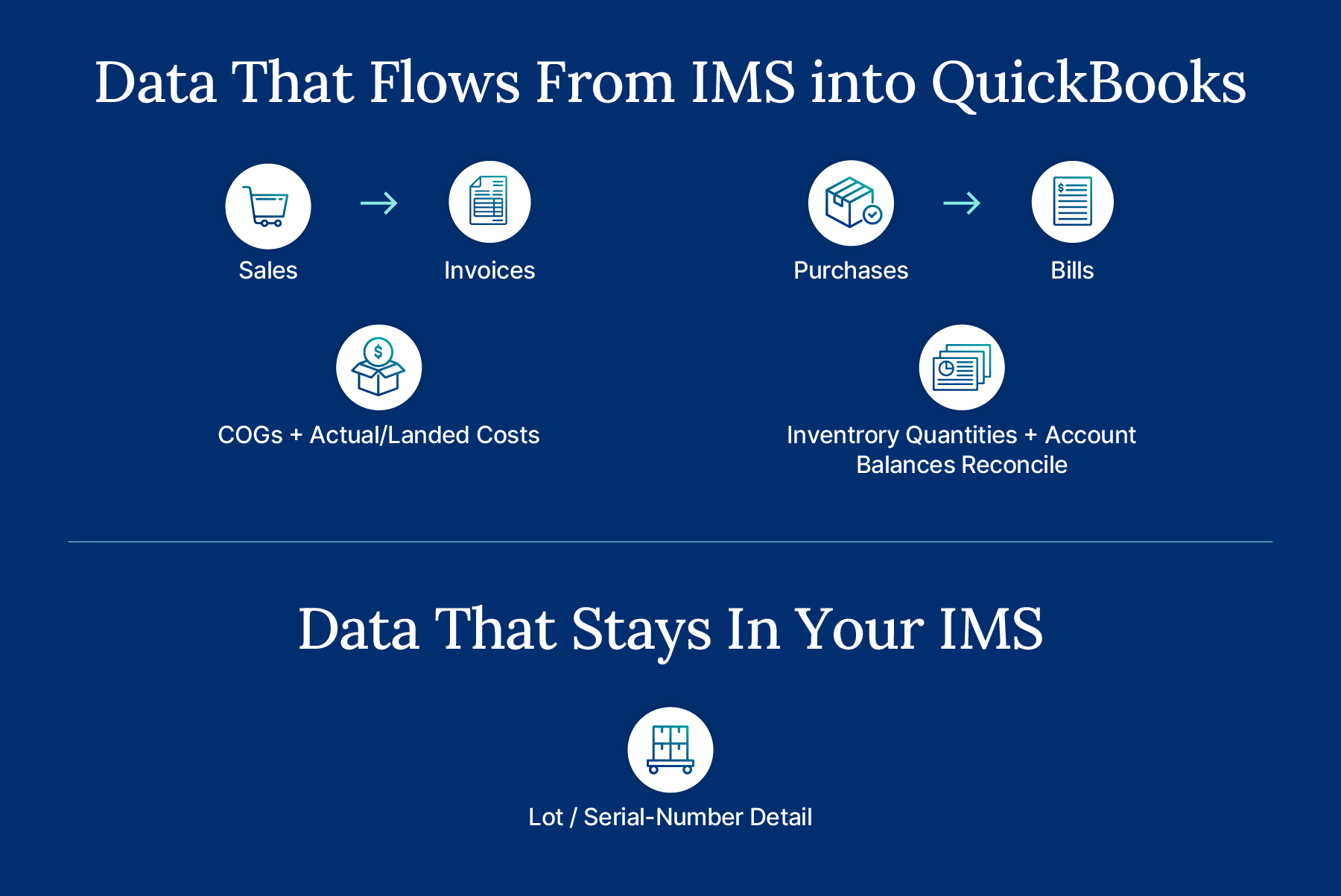
Here's what usually does not flow into QuickBooks: the granular lot and serial-number detail lives in your inventory system, because QuickBooks posts at the bill and invoice level, not down to every individual unit's history. That's normal and fine, as long as you know where to look for what. If a regulator or a customer ever asks you to trace a specific lot, you'll pull that report from your IMS, not from QuickBooks, and that's by design. QuickBooks wants the financial summary; your inventory system keeps the receipts.
One more thing worth insisting on. There's a real difference between a native connector, a paid third-party middleware tool, and a plain one-way CSV export. They are not the same, and the cheapest option is often the one that quietly creates the most manual work. A native connector is built and maintained by the inventory vendor and tends to sync the deepest. Middleware sits between two systems and often carries its own monthly fee and its own failure points. A CSV export is really just a fancier version of the manual imports you're trying to escape. Ask any vendor point-blank which one you're getting. And if you sell seasonally, ask about API rate limits too, because a connector that keeps up in April may choke during your holiday rush. Confirm all of this before you commit, not after.
How Real-Time Stock Tracking Works With QuickBooks
Here's the bit that trips people up. QuickBooks isn't where live stock lives. When an order lands on Shopify, your IMS deducts it right away and updates every other channel, so you don't sell the same last unit twice.
QuickBooks then gets the invoice and the COGS entry. One system counts, the other one keeps score. The same split holds when you add warehouses or a 3PL, because the IMS tracks every receipt, transfer, and sale while QuickBooks gets only the postings your accountant cares about.
It also explains why a nightly CSV export can't keep up. If stock only updates once a day, a busy morning can oversell before anyone notices, and your books inherit the mess.
How to Choose Inventory Software That Works With QuickBooks
Choosing well comes down to two questions: does the tool fit how your business actually operates, and does it connect to QuickBooks the way you need? Nail both and the rest is detail. Here's how we'd size it up.
Match the Tool to Your Business Type
Start with your business model, because the right tool for a wholesaler is the wrong tool for a manufacturer.
| Business Type | Must-Have Features | QuickBooks Watch-Out |
|---|---|---|
| Retail and omnichannel | Multichannel stock sync and POS support | Inventory needs QuickBooks Online Plus or Advanced, or Intuit's paid add-on on Simple Start and Essentials |
| E-commerce | Tight retail and e-commerce connections to Shopify, Amazon, and other marketplaces | Live stock has to stay true across every storefront, and QuickBooks only sees the sales postings |
| Wholesale and B2B | Sales orders, EDI, and price tiers built for wholesale and distribution | Confirm larger orders post cleanly into QuickBooks as invoices and bills |
| Manufacturing | Multi-level BOM, assemblies, and WIP for manufacturers | Production costs must map to the right QuickBooks accounts so COGS reflects what you built |
| Food and beverage | Lot and expiry tracking for food and beverage brands | Lot and expiry detail stays in the IMS, since QuickBooks posts at the bill and invoice level |
Cost mapping is where manufacturers get burned most often: a tool that tracks assemblies but can't translate build costs into clean journal entries leaves your accountant doing math by hand every month. Match the tool to the work, and the QuickBooks side falls into place.
Evaluation Checklist
Once you've narrowed by business type, run every candidate through the same checklist so you're comparing apples to apples:
- QuickBooks version compatibility (is it built for QuickBooks Online, Desktop, or both?).
- Sync depth and direction (two-way or one-way, real-time or batched?).
- COGS and landed-cost accuracy, plus clean opening-balance reconciliation when you first connect.
- Native connector versus paid middleware, and any hidden connector fees hiding in the fine print.
- Onboarding timeline and whether you'll need outside help.
- Sync-reliability reviews from real customers, not just marketing copy.
- Room to scale as your SKUs, channels, and locations grow.
One more tip: insist on transparent pricing. Some of the tools that rank highest online won't show you a number until you're deep in a sales call, and that's a yellow flag. Finally, if a vendor leans on the classic "inventory carrying cost is 20 to 30% of inventory value" line, know the nuance. That 20 to 30% figure is the textbook range once you include the full cost of capital. APQC's empirical cross-industry median, drawn from 6,468 companies, is closer to 10%. Both are useful; just don't let anyone dress up the textbook number as hard benchmark data.
Setting Up and Testing Your QuickBooks Integration
Set up your integration carefully once, and it'll run quietly for years. Rush it, and you'll spend months untangling your books, so treat the first connection like a controlled experiment. Here's the sequence we recommend:
- Connect in a test or sandbox environment first, before you touch live data.
- Map your inventory items and financial accounts (sales, purchases, COGS, and adjustments) to the correct QuickBooks accounts.
- Choose your sync frequency, real-time or batched, based on your order volume.
- Run bidirectional test transactions, a sale and a purchase, and watch them post in both systems.
- Audit your opening stock and account balances so day one starts from the truth.
- Document your settings so future-you (or a new hire) knows how it's wired.
- Then, and only then, train your team on the day-to-day workflow.
With Cin7, this flow is refreshingly undramatic. You connect to QuickBooks Online from within Cin7 itself, with no developer required, then map your accounts and set your sync preferences. Our onboarding specialists help you get the mapping right the first time, which is exactly the step most people wish they'd slowed down for.
Best Inventory Software for QuickBooks, by Business Size
The right tool depends on your size and complexity, so it helps to think in tiers rather than chase a giant ranked list. Ranked lists tempt you to pick the "number one" option, but the best tool for a 200-SKU Shopify shop and the best tool for a multi-warehouse manufacturer are almost never the same product. At the smallest end, QuickBooks Online's native inventory plus a light add-on or two can carry a single-location business with a modest catalog. As you grow, small-business connectors bridge QuickBooks to one or two sales channels. And at the top, mid-market omnichannel and manufacturing platforms handle the messy, multi-location, multichannel reality that most scaling brands eventually live in.
| Tier | Example Tool | Best For | QuickBooks Version Supported |
|---|---|---|---|
| Starter | QuickBooks Online native inventory | One location, a modest catalog, and no manufacturing | QuickBooks Online Plus and Advanced, or Simple Start and Essentials with Intuit's add-on |
| Small business | SOS Inventory | Teams that want inventory software designed from the ground up for QuickBooks Online | QuickBooks Online (SOS asks you to turn off QuickBooks inventory tracking) |
| Small business | inFlow | Small teams that want orders and inventory totals pushed into their books | All paid QuickBooks Online plans, with a one-way push of orders, COGS, and inventory value |
| Growing manufacturers | Fishbowl | Manufacturing and warehouse teams, including those still on QuickBooks Desktop | QuickBooks Online Plus and Advanced, plus Desktop Pro, Premier, and Enterprise |
| Mid-market omnichannel and manufacturing | Cin7 | Multichannel, multi-location brands that also build products | Native QuickBooks Online integration |
Weighing your options? We've laid out the tradeoffs in Cin7 vs. Fishbowl and Cin7 vs. inFlow, so you can compare them side by side.
If you want to stay inside the Intuit family, QuickBooks Desktop Enterprise's Advanced Inventory is the baseline option, and it's included only in Enterprise Platinum and Diamond. It's more capable than QuickBooks Online for warehouse-style tracking (think bin locations and barcode scanning), but the tradeoffs are real: it's Desktop-based, so you're tethered to a local machine, it carries a higher cost, and it brings added complexity. For a lot of growing businesses, that's trading one set of limits for another.
This is the tier where we fit. Cin7 sits in the mid-market omnichannel and manufacturing space, with native QuickBooks Online integration, 700+ integrations (Shopify, Amazon, Walmart Marketplace, and more), multi-level BOM and assemblies, AI-driven demand forecasting, and EDI for B2B (built into Cin7 Omni, with partner connections on Cin7 Core). Think of it as "ERP Lite" power without the ERP cost and complexity.
What Results Can You Expect From Inventory Software for QuickBooks?
The payoff from inventory software for QuickBooks shows up in four places: less double entry, accurate COGS, a faster month-end close, and fewer stockouts. When sales, purchases, and costs post automatically, nobody rekeys orders, and your margins reflect what really happened. Month-end turns into a review instead of a rescue mission.
Fewer stockouts come from the same shift. Once live stock sits in one system that every channel reads from, you stop selling units you don't have and start reordering before the shelf goes bare. Here's what that looks like for two of our customers.
BudTrainer: Fixing Years of Inflated COGS
BudTrainer, a Canadian consumer goods brand selling on Amazon, Shopify, and through retailers, ran its inventory in QuickBooks. Moving stock data into Shopify was manual, and packaging, stickers, and freight all went straight into COGS. As the team put it, "For the first three and half years of the company, our COGS were always higher than they should have been."
Moving from QuickBooks to Cin7 took six short weeks. Today, Cin7 is BudTrainer's single source of truth, with accurate COGS, landed cost and pricing calculations, and revenue per product per channel. "Life before Cin7 was unpredictable. After Cin7, we're able to invest our money without second guessing."
Second Skin Audio: Scaling Past QuickBooks Desktop
Second Skin Audio, an e-commerce soundproofing company, inherited QuickBooks Desktop as its inventory system. As it scaled, QuickBooks couldn't keep up with inventory and couldn't talk to BigCommerce or Amazon, which meant manual transaction imports, spreadsheet-based planning, and stock slipping through the cracks. Its books now live in Xero, so this one's a story about outgrowing QuickBooks Desktop for inventory.
With a Cin7 Partner managing the rollout, implementing Cin7 Core took about a month. The owner estimates that updating product information in bulk now takes about 90% less admin work. Today the team supports three warehouses (its own warehouse plus two 3PLs) with automated kitting and assembly, and revenue has grown from roughly $1 million when it adopted Cin7 to between $5 and $6 million.
How to Measure the Payoff in Your First 90 Days
Want proof for your own business? Grab a baseline before you switch, then check the same numbers after a full quarter of running both systems together.
- Hours per week spent rekeying orders, bills, and stock adjustments
- Days it takes to close the books each month
- Stockouts and oversells per month, by channel
- The gap between your counted stock and what the system says
- COGS variance once landed costs flow through automatically
If those numbers aren't moving after 90 days, check your account mapping first. It's the step most people wish they'd slowed down for, and it's usually the culprit when the numbers don't add up.
How Cin7 Works With QuickBooks
Cin7 works with QuickBooks by running your operations while QuickBooks keeps running your books, and the two stay in sync automatically. Our native QuickBooks Online integration keeps sales, purchases, invoices, and your actual and landed costs aligned, so your margins reflect reality without anyone rekeying a thing. You set it up from within Cin7, no developer required, and you choose real-time or batched sync depending on how your business runs.
From there, you get the omnichannel and manufacturing depth QuickBooks simply wasn't built for: multi-warehouse stock, bin and barcode accuracy, multi-level BOM and assemblies, and AI-driven demand forecasting that helps you buy smarter. With 700+ integrations, your online stores, marketplaces, POS, and 3PLs all feed the same source of truth, so the number you see is the number you have. Meanwhile, QuickBooks stays exactly what it's great at being: your accounting book of record. Nothing gets ripped out, and nobody has to become a systems integrator to make it work. If you're curious how the connection has evolved, you can read about our QuickBooks integration updates.
Adding AI Forecasting to QuickBooks
Here's how AI inventory management works alongside QuickBooks. Cin7 ForesightAI reads your sales history from every channel and suggests what to reorder and when, with forecasts up to 24 months out. You review the suggestions and raise the purchase orders in Cin7. QuickBooks only sees the result, as bills, so your accountant's workflow doesn't change while your buying gets a lot smarter. Start with your fastest movers, then widen the net once you trust the suggestions.
If your stock has outgrown your books, we'd love to show you how the pieces fit together. Request a demo and see it with your own numbers.
Frequently Asked Questions
Does QuickBooks have built-in inventory management?
Yes, on QuickBooks Online Plus and Advanced. You can track quantity on hand, cost of goods sold, low-stock alerts, purchase orders, and basic reports. On Simple Start or Essentials, you'll need Intuit's paid inventory add-on. Either way, it stops short of multi-warehouse stock, barcode depth, real manufacturing, and forecasting. Once you need those, it's time to add a dedicated system.
What is the best inventory software for QuickBooks Online?
It depends on your business type. The best choice is the one built for how you actually operate, whether that's e-commerce, wholesale, retail, or manufacturing, and one that connects to QuickBooks Online with a genuine two-way sync. Start there, then compare sync depth, cost accuracy, and onboarding. A tool that's perfect for a wholesaler can be badly overbuilt (or underbuilt) for a single-channel e-commerce brand, so resist the urge to just pick whatever tops a listicle.
Can inventory software work with QuickBooks Desktop?
Yes. Most integrations connect to Desktop through the Web Connector, a local Windows app that syncs on a schedule you set or when you click Update, and only while it's running. Keep in mind Intuit stopped selling new Desktop Pro Plus, Premier Plus, and Mac Plus subscriptions to US customers after September 30, 2024, though existing subscribers can still renew and Enterprise isn't affected.
Is there free inventory software that works with QuickBooks?
Yes, at the low end. QuickBooks Online's native tools plus a free or low-cost connector can handle a single location with a small catalog. The catch is scale: as your SKUs, channels, and locations multiply, free tools tend to buckle, and the manual workarounds cost more than a proper system would.
How does inventory software sync with QuickBooks?
It usually syncs two ways. With QuickBooks Online, a modern API keeps things near-real-time; with Desktop, the Web Connector syncs on a schedule or when you click Update. Either way, sales typically post as invoices, purchases as bills, and inventory quantities and account balances reconcile, while granular lot and serial detail stays in your inventory system.
When should a business move beyond QuickBooks' built-in inventory tools?
When you hit the triggers: a second location, a need for bin or barcode accuracy, BOM or WIP for manufacturing, real-time multichannel stock, automated reordering or forecasting, or more than a few hundred SKUs (our rule of thumb). Hit even one, and a dedicated IMS alongside QuickBooks will save you time and money.
More from the blog
View All Posts
Best Inventory Management System for Small Business (2026 Picks)
Read More
The Best Inventory Control Software for Small Business
Read More