









The best manufacturing inventory software is the one that fits how you make and how you sell. If you do simple assembly and sell across several channels, an inventory-first IMS like Cin7 fits. Shop-floor-heavy makers should look at production-centric MRP tools, while complex enterprise operations need full ERP.
Simple, right? Well, sort of.
According to the National Association of Manufacturers' (NAM) Q2 2026 Manufacturers' Outlook Survey, 83.1% of manufacturers named rising raw-material costs their top business challenge. When every component costs more, a fuzzy bill of materials (BOM) cost quietly eats your margin.
And if you've read a few "best of" lists already, you've probably spotted the pattern. Every vendor ranks its own tool first. (We see you, and yes, we're a vendor too!)
The lists also disagree because they're answering different questions. A tool that's perfect for a 40-machine job shop can be overkill for a skincare brand that kits gift sets and ships to Amazon.
So we'll be upfront. Cin7 is an inventory management system (IMS) built for brands that make and sell, and we're not an ERP. Instead of another ranked list, this guide gives you a ladder, so you can pick by your stage instead of by feature count.
Key Takeaways
- The best manufacturing inventory software matches your production complexity and your sales channels, so there's no single winner.
- Most small and midsize brands need inventory-first software with BOMs and assembly before they need a full MRP or ERP.
- If you make products and sell them on Shopify, Amazon, and wholesale, channel sync matters as much as BOMs.
- AI forecasting is the most under-covered feature on today's shortlists, and it's where planning gets easier.
- Check current pricing and what's actually included (integrations, MRP, add-ons) before you sign.
What Manufacturing Inventory Software Actually Does
Manufacturing inventory software tracks how raw materials become finished goods, and what that change really costs you. That's the big difference from a basic stock app.
Raw Materials, Work in Progress, and Finished Goods
A generic inventory app tracks items. Manufacturing inventory management tracks transformation: raw materials become work in progress (WIP), and WIP becomes finished goods you can sell.
The bill of materials is the engine. A BOM lists every component, sub-assembly, and quantity a product needs.
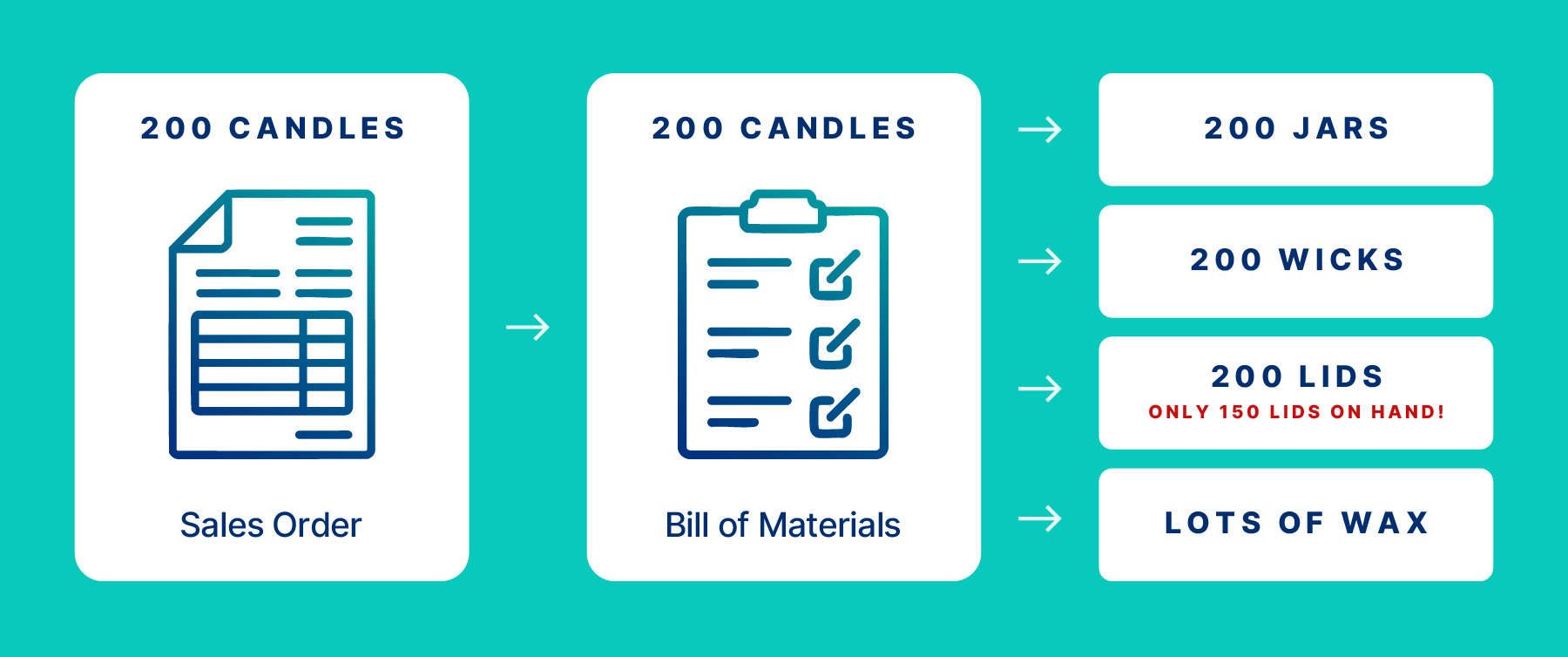
Say an order for 200 candles lands. Good bill of materials software turns it into demand for 200 jars, 200 wicks, 200 lids, and a whole lot of wax.
Then the assembly does the math. Building a product consumes components from stock and adds finished goods at a real cost. Labor, overhead, and waste should roll into that cost, so your cost of goods sold (COGS) reflects reality instead of hope.
In Cin7, BOM costs can include labor, overhead, and waste. Our Finished Goods Analysis Report then shows the actual cost of what you built.
Skip this step and you'll meet the moment every maker dreads: "We sold 200 units, but we only have lids for 150."
WIP inventory you can't see is WIP inventory you can't plan around. And raw materials you can't count are raw materials you'll reorder twice.
Why Spreadsheets and QuickBooks Hit a Wall
In our experience, QuickBooks and Xero are great at accounting, but they weren't built to run production. Multi-level BOMs, WIP tracking, and production scheduling are where we see them hit their limits.
So most growing makers patch the gap with spreadsheets. It works for a while, especially when you have one product line and one sales channel. Then you add a second warehouse or a wholesale account, and the symptoms show up:
- You reconcile stock counts by hand every week.
- Your counts are out of date by lunchtime.
- Your COGS is an educated guess.
- You oversell on one channel because another didn't update.
Sound familiar? Here's the good news: you usually don't need to replace your accounting software. You need to connect your inventory to it.
Cin7 has native integrations with QuickBooks Online, plus a direct Xero integration. Your accountant keeps the tool they love, and your books finally get real inventory data. Everybody wins (especially your month-end close).
Inventory-First Software vs. MRP vs. ERP: Know Your Rung on the Ladder
Most product brands don't need the top rung of the ladder. They need the right rung for today, plus a clear path to the next one.
The Systems Ladder, Explained
Think of your systems as a ladder. Each rung adds power, cost, and complexity:
- Spreadsheets plus accounting. Cheap and familiar, until your SKU or channel count grows.
- Inventory-first IMS with BOMs and assembly. Real-time stock, BOMs, assemblies, and channel sync in one place.
- MRP (material requirements planning). Plans materials from your BOM, master schedule, and inventory records, and MRP II adds capacity planning.
- MES (manufacturing execution system). Runs shop-floor execution, tracking what's happening at each work center right now.
- ERP (enterprise resource planning). Handles business planning and logistics across the whole enterprise.
The Encyclopedia of Small Business describes MRP as a system built "to assist production managers in scheduling and placing orders for items of dependent demand."
Dependent demand just means demand that comes from something else. You need lids because you're making candles!
Oliver Wight's MRP II later added capacity planning and other functions. Both MRP and MRP II are predecessors of ERP. In our own categorization, we'd put production-first MRP tools such as Katana or MRPeasy on rung three.
The ISA-95 standard (also published as IEC 62264) places MES at Level 3. That's between ERP at Level 4 and machine-level process control below it. In plain English, ERP sets the business plan, MES drives the shop floor, and machines do the work.
Here's our view: most brands doing $1 million to $50 million a year live on rungs two and three. That's where Cin7 sits. We're an IMS (think "ERP Lite"), with assembly on every Core plan and MRP plus advanced production for growing makers.
Signs You Need Full MRP or ERP (and Signs You Don't)
If your complexity lives on the shop floor, move up the ladder. If it lives in your sales channels, you probably don't need to (yet).
You likely need heavier MRP or ERP if you:
- Run routing-heavy, multi-step production through many work centers
- Manage complex process manufacturing
- Operate regulated, multi-plant facilities
- Need financial consolidation across several entities
You likely don't need it yet if you:
- Assemble, kit, or bundle finished goods
- Run light-to-moderate production with BOMs
- Feel most of your pain in orders, channels, and stock sync
Why be so careful about moving up? ERP projects are big commitments, and they commonly run long and over budget.
Research firms also measure "failure" so differently that no single number tells the story. Some count missed business goals, while others count blown budgets or schedules.
So we won't hand you one scary failure rate. The useful lesson is simpler: bigger systems carry bigger risk, so buy the rung you need.
The Hidden Rung: Making and Selling at the Same Time
The rung most guides skip belongs to brands that manufacture and sell across channels at the same time. You might make your product in-house, then sell it on your Shopify store, on Amazon, to wholesale accounts, and in retail. That's a lot of places where one stock count has to stay accurate.
Each channel also moves differently. DTC orders trickle in one at a time, while a wholesale PO can swallow half your finished goods in one go.
Online selling keeps growing, too. According to the U.S. Census Bureau, e-commerce made up 17.1% of total U.S. retail sales in Q2 2026.
That's $340.2 billion, up 12.2% year over year (seasonally adjusted). If you sell direct to consumers, that's a channel you can't afford to run on guesswork.
Many production-centric MRP tools treat sales channels as an afterthought. The result? Overselling, manual order entry, and a lot of spreadsheet glue.
This is our home turf. Cin7 connects with 700+ app partners, including QuickBooks Online, Xero, Shopify, and Amazon. Each plan includes a set number of integrations, and you can add more as you grow.
The Features That Separate Good From "Good Enough"
Six features decide whether your software keeps up with you or holds you back. Use these as your demo checklist, and score each vendor against the way you actually work.
Multi-Level Bills of Materials and Assembly
Multi-level BOMs become non-negotiable once your products contain sub-assemblies. Picture a gift set that contains a candle, which contains a wick assembly. Multi-level BOMs roll costs up accurately from the smallest component to the finished product.
Good BOM software also handles units of measure, so you can buy wax by the kilo and use it by the gram. Look for disassembly too, for breaking down kits or returns.
Cin7 supports multi-level assemblies and sub-assemblies, and you can import BOMs in bulk by CSV. Because nobody wants to retype 400 BOMs by hand. Nobody!
Costing can use average, latest, or fixed purchase cost, depending on how your finance team works.
Production Planning, Scheduling, and MRP
MRP turns demand into a buy-and-build plan, so you're not guessing what to order or when. Good production planning software checks demand against stock and BOMs, then recommends purchases and production runs.
Here's how that plays out. A wholesale order for 1,000 units lands, and MRP checks your stock of every component. It then tells you what to buy, what to build, and when.
As you grow, you'll want capacity planning, a visual scheduler, and work orders. Our Advanced Production add-on includes a Capacity Planner that flags over-allocation and helps you re-plan. It also includes a visual Production Scheduler for rescheduling orders and operations.
The add-on also covers work-order management and shop-floor control, including real-time monitoring of production tasks.
Lot, Batch, and Serial Traceability
Traceability decides whether a recall means pulling one batch or emptying your whole shelf. Lot tracking software ties each finished good back to the component batches and expiry dates inside it.
In a demo, ask the vendor to trace one batch both ways. Which finished goods used it, and which customers received them? You want that answer in minutes, not days.
Food makers should watch FSMA 204, the FDA's Food Traceability Rule. Congress directed the FDA not to enforce the rule before July 20, 2028, and the FDA says it intends to comply. It applies to foods on the FDA's Food Traceability List, and only the date moved, while the record-keeping requirements stay the same.
Batch and serial tracking come with every Cin7 Core plan. Cin7 customer Oji cut a batch-control check from upwards of one hour to one or two minutes.
Accounting Integration That Gets COGS Right
"It integrates with QuickBooks" isn't enough. Ask what actually syncs.
Invoices are the easy part. Your books should also reflect COGS, assembly transactions, and finished-goods cost, so your profit and loss matches what you built and sold.
This matters more every quarter. NAM's Q3 2026 survey projects manufacturers' input costs will rise 5.0% over the next year, so stale cost data gets staler fast.
Cin7 integrates natively with QuickBooks Online and Xero. In every demo, ask: "When I complete an assembly, what lands in my books?" If the answer starts with a long pause, keep looking.
Multichannel Sales and Order Sync
One stock pool across every channel is how you stop overselling. Your Shopify store, Amazon listings, wholesale portal, and EDI orders from retail partners should all draw from the same inventory.
When a big wholesale order ships, your online store should know about it in real time. No double-selling the last 50 units! Ask every vendor how quickly stock updates after a sale, and whether B2B and DTC orders really share one pool.
EDI matters once retail partners start sending purchase orders electronically. For example, Glove Glu replaced manual Amazon vendor PO entry with a Cin7 EDI integration (more on that below).
AI Demand Forecasting
AI demand forecasting is the feature most shortlists skip, and it's where planning gets easier. McKinsey reported that AI-driven forecasting can reduce supply-chain forecast errors by 20 to 50 percent. McKinsey says that can mean up to 65% fewer lost sales from product unavailability.
That's a range of potential from general supply-chain research, not a guarantee. The same article argues AI forecasting can work even when data is limited, which is good news for smaller brands.
McKinsey's authors suggest four tactics for data-light settings: choose the right model, smooth out anomalies, run what-if scenarios, and add external data. In other words, a short sales history isn't a dealbreaker.
Our ForesightAI add-on forecasts demand up to 24 months ahead and handles smart replenishment, like auto-generated POs and safety stock. We recommend at least six months of sales history to get started.
What Choosing the Wrong System Really Costs
Overbuying and underbuying both cost you. They just send the bill at different times.
Overbuying hurts up front, with big contracts and slow rollouts. Underbuying hurts later, when you're forced to switch systems in the middle of a growth spurt.
Overbuying: The ERP You Didn't Need
An oversized system brings long rollouts, consultant invoices, and a team that never quite adopts it. You pay for power you don't use, then pay again in lost time.
And big ERP rollouts rarely move fast. They're a serious commitment of time, money, and patience, and they often stretch longer than planned.
Oji Foodservice Packaging Solutions knows this story well. According to Cin7's case study, the team inherited an SAP system and cited "really big invoices for SAP." They also depended on shared-services teams for support.
Worse, the system felt like it needed "a degree to know how to use." That's a lot of software for a packaging business to carry.
Oji moved to Cin7 and went live in 14 days, per the case study. "With Cin7, we're independent and don't have to rely on anyone else," the team shared.
Underbuying: The Tool You Outgrow in 18 Months
Underbuying feels cheap on day one. Then you hit a channel limit, a user cap, or a missing feature, and you're re-platforming.
Re-platforming means migrating data, retraining your team, and rebuilding every integration. And it usually happens at the worst time, like right after you land a big retail account. Meanwhile, the add-ons pile up: an extra connector here, a few more users there.
Before you sign, check the plan limits that matter most: users, sales orders per year, included integrations, and locations. Then ask what happens when you cross each one.
So price the total, not the sticker. Your real cost includes the plan, users, integrations, add-ons, and implementation. A cheap plan that needs five paid connectors isn't so cheap anymore.
How to Choose the Right Manufacturing Inventory Software
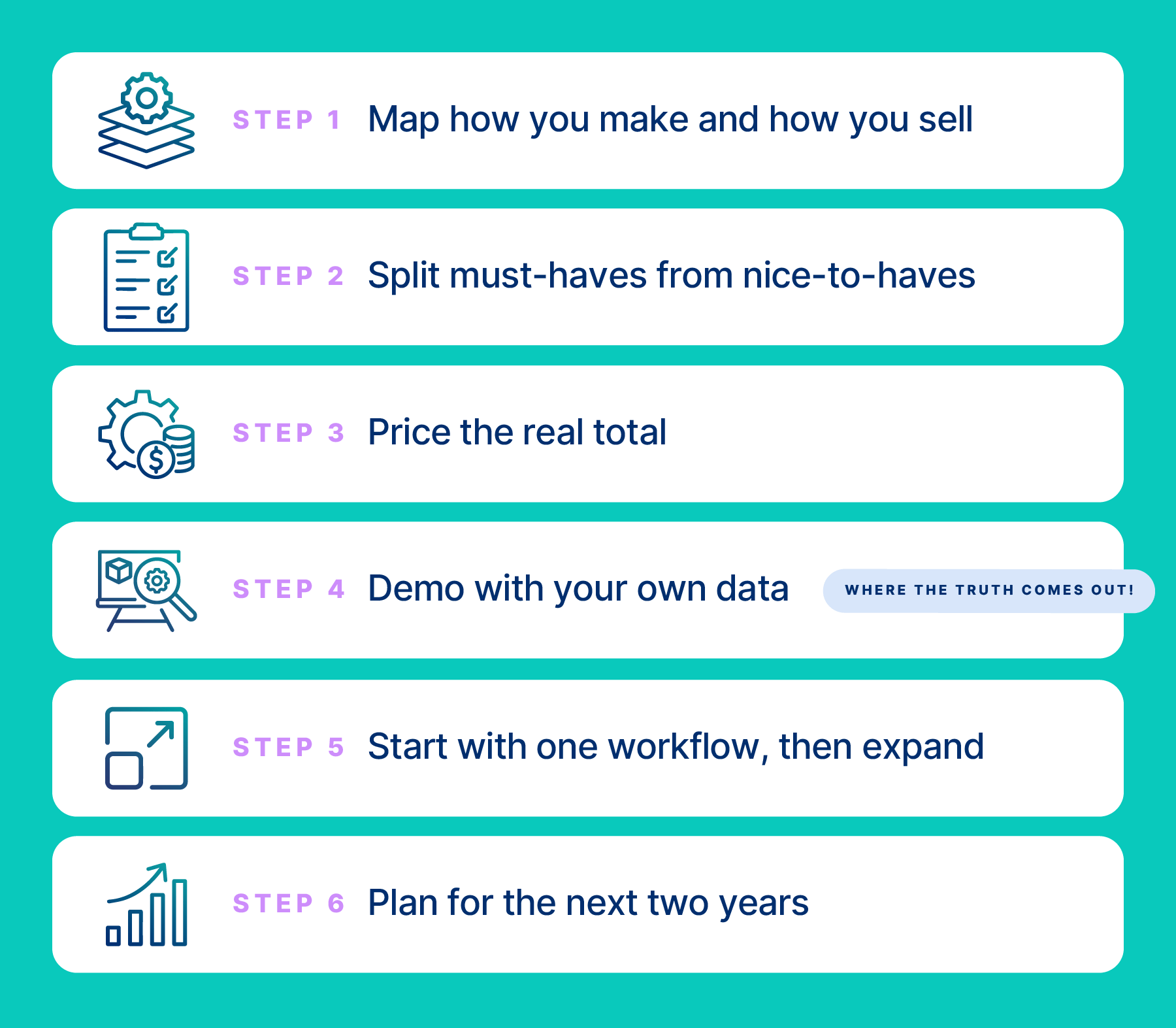
Finding the best manufacturing inventory software starts with your operations, not a vendor's feature list. These six steps will get you to a confident decision:
- Map how you make and how you sell. Note whether you do simple assembly or multi-step production, and list every sales channel.
- Split must-haves from nice-to-haves. Cover BOM levels, MRP, lot tracking, channels, and accounting sync.
- Price the real total. Add up the plan, users, integrations, add-ons, and implementation.
- Demo with your own data. Bring a real BOM and a real order, and walk them through end to end.
- Start with one workflow, then expand. Measure time saved, stock accuracy, and how confident you feel about COGS.
- Plan for the next two years. Ask how the system grows with new channels, products, and production steps.
Watch for red flags along the way. Vague answers about add-on pricing, demos that never leave sample data, and "we can customize that" for every question should all slow you down.
Step four is where the truth comes out. A polished demo with sample data tells you little. Watching your own 12-component BOM turn into a costed finished good tells you plenty!
Step five matters more than it looks. In our experience, people and adoption shape results more than any feature list does. If your team won't use it, the features don't matter.
So involve the people who'll live in the software every day. Your warehouse lead and your bookkeeper will spot problems no sales rep will mention.
Not sure what to ask in a demo? Start with these questions:
- How do multi-level BOMs roll up labor, overhead, and waste into cost?
- What syncs to my accounting software when I finish an assembly?
- How do Shopify, Amazon, and wholesale orders share one stock pool?
- Which features are add-ons, and what do they cost?
- How long does a typical implementation take for a business my size?
- What happens when I outgrow my plan's limits?
Your Production Line Deserves Better Than Guesswork
You didn't start a product business to babysit spreadsheets. You started it to make something great and get it into customers' hands.
The best manufacturing inventory software for your business gives you that time back. It shows what you have, what you need, and what everything really costs. The wrong one either buries you in complexity or leaves you patching gaps by hand.
So don't chase the longest feature list or the biggest brand name. Find your rung on the ladder, pick the system that fits it, and make sure it can grow with you. Your future self (and your accountant) will thank you!
Why Choose Cin7 for Manufacturing Inventory Software
If you make products and sell them across channels, we think Cin7 earns a spot on your shortlist. We serve 8,500+ customers, by our own count, and we built our platform around brands like yours. Here's why it fits, in plain terms.
Built for Brands That Make and Sell
Cin7 is an IMS (or "ERP Lite") that connects production and multichannel selling in one stock pool. Your DTC store, Amazon, wholesale and B2B orders, and EDI all draw from the same inventory.
We connect with 700+ app partners, including QuickBooks Online, Xero, Shopify, and Amazon. Core plans include two, four, or six integrations, and more are available.
Take GloveGlu. The UK grip-spray brand replaced manual Amazon vendor PO entry with a Cin7 EDI integration. According to the case study, the brand "tripled its turnover without growing its team."
As the team puts it in the case study: "By moving to a Cin7 EDI integration, everything comes in automatically. You really take out that human error."
Manufacturing Depth That Grows With You
You may have read that Cin7 only handles light manufacturing. Here's what's actually included.
Every Core plan includes multi-level BOMs, assembly and disassembly, and batch and serial tracking. MRP is included on Pro and Advanced. Our Advanced Production add-on brings the Capacity Planner, Production Scheduler, work orders, and co-product and by-product costing.
Every plan also includes unlimited inventory locations. Advanced Production isn't available on Standard, and it's an add-on on Pro and Advanced.
We'll also be honest about our boundaries. We're not an ERP. If you run routing-heavy production across many work centers or multi-plant process manufacturing, you may need more than we offer.
Forecasting, Pricing, and Speed to Value
Our ForesightAI add-on forecasts demand up to 24 months ahead and powers smart replenishment. We recommend about six months of sales history to start. On our ForesightAI page, HairCo's Dion Alessi shares: "In just three months of following Cin7's forecasting recommendations, we saw a 10% increase in sales."
Pricing is out in the open, too.
As of October 2026, Cin7 Core starts at $349/month (Standard), $599 (Pro), and $1,199 (Advanced), USD for new customers, per our pricing page. Prices exclude taxes. Users, annual sales orders, and included integrations scale by plan (5, 10, or 15 users, for example).
And you won't wait months to see value.
Oji Foodservice Packaging Solutions went live in 14 days after leaving SAP, according to the case study. As the Oji team put it: "We didn't need to be an expert to use Cin7. It was user friendly."
Ready to See It With Your Own BOM?
The best way to judge any manufacturing inventory software is with your own data. Bring a real BOM and a real order, and we'll walk them through Cin7 together, end to end. No sample-data magic tricks!
Frequently Asked Questions
What Is the Best Inventory Management System for Manufacturing?
The best system depends on how you make and how you sell. Assembly-led brands selling across channels usually fit an inventory-first IMS like Cin7. Shop-floor-heavy makers lean toward MRP tools, and complex enterprises need ERP.
See "The Systems Ladder, Explained" above to find your rung.
Can QuickBooks Do Manufacturing?
In our experience, QuickBooks handles accounting well, but it isn't built for multi-level BOMs, WIP tracking, or production scheduling. Most makers connect dedicated inventory software to QuickBooks instead of replacing it, so inventory handles production while QuickBooks handles the books. Cin7 integrates natively with QuickBooks Online and Xero.
What's the Difference Between Inventory Software and Manufacturing ERP?
Inventory software focuses on stock, BOMs, assemblies, and orders. Manufacturing ERP covers business planning and logistics across the whole enterprise, with more cost and complexity to match. Many small and midsize makers sit between the two, on an inventory-first IMS with BOMs and MRP.
Check "Signs You Need Full MRP or ERP (and Signs You Don't)" above to see where you land.
How Much Does Manufacturing Inventory Software Cost?
It varies widely by vendor, plan, and add-ons.
As of October 2026, Cin7 Core starts at $349/month (Standard), $599 (Pro), and $1,199 (Advanced), USD for new customers, per our pricing page. Add-on prices, like ForesightAI, aren't published, so ask for a full quote. Whatever you compare, price the real total: plan, users, integrations, add-ons, and implementation.
Is There Free Manufacturing Inventory Software?
Yes, free tiers and open-source options exist, and they can work for a very small shop with one channel. The tradeoffs usually show up in support, implementation help, and channel sync. If you sell on several channels, weigh the time you'll spend filling those gaps yourself.
How Long Does It Take to Implement Manufacturing Inventory Software?
It varies by complexity: your data, your integrations, and how many workflows you move at once all play a part.
According to Cin7's case study, Oji Foodservice Packaging Solutions went live on Cin7 in 14 days after leaving SAP. Glove Glu went live in about a month, signing in August and going live in September, per its case study.