









You add one new hoodie to the line. It comes in four colors and six sizes. Congratulations, you just made 24 SKUs!
Each one needs fabric, trims, a production run, and a listing on Shopify, Amazon, and your wholesale portal. Multiply that across a season, and your spreadsheet starts sweating.
Online growth is real for product brands. US e-commerce reached 17.1% of all retail sales in Q2 2026 (seasonally adjusted). That figure covers every retail category, and most homegrown setups weren't built for that level of growth.
Here's the trouble with most advice on apparel inventory management software. Retail guides ignore production. Manufacturing guides ignore sizes, colors, and online channels.
If you make clothes and sell them online, you need both halves. We work with product brands every day, and the pattern is clear: you need one system that connects what you make with where you sell. This guide shows you how to tell which type of system fits, and how to test it before you sign.
Key Takeaways
- Apparel makers selling online need inventory software that handles style, color, and size variants, bills of materials, and multichannel sync in one place.
- Retail POS tools often skip raw materials, and manufacturing MRPs often treat size matrices and Shopify as an afterthought.
- An inventory management system (IMS) suits most growing brands, while apparel ERPs fit larger, more complex operations.
- Build your shortlist by matching software to your business model: DTC maker, wholesaler, or both.
- Test every vendor with one real style, from fabric to Shopify listing, before you sign.
Why Apparel Makers Outgrow Spreadsheets (and Shopify) Faster Than Anyone
Apparel is a triple threat for inventory. You juggle sizes and colors like a retailer, raw materials like a factory, and channels like a marketplace seller.
Most tools handle one of those jobs well. Few handle all three, and that gap is where your stock counts start hanging by a thread.
Knowing which pressure point hurts most tells you what to prioritize when you shop.
The Size and Color Matrix Multiplies Everything
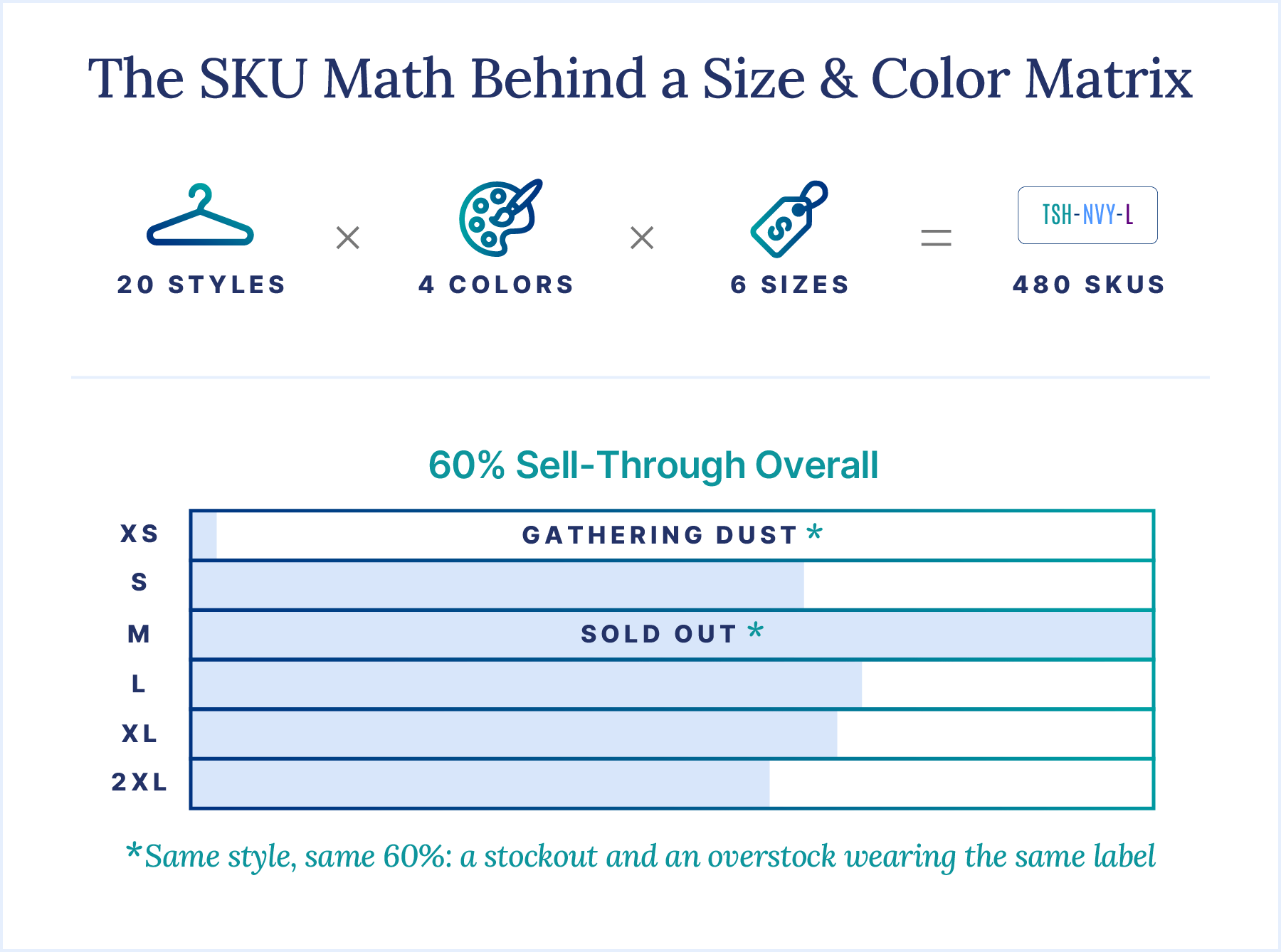
Every style you design multiplies into dozens of SKUs (stock keeping units, the unique codes you track each item by). The math gets big fast. Twenty styles in four colors and six sizes equals 480 SKUs, and that's before you add a second fabric.
Each of those SKUs needs its own stock level, its own reorder point, and its own listing on every channel. Miss one, and you're either sold out of the size everyone wants or sitting on a pile nobody asked for.
Shopify has loosened up here. You now have a limit of up to 2,048 variants per product. You still get only three options, such as style, color, and size.
So the variant cap matters less than it used to. Keeping hundreds of variants accurate is the hard part now.
There's a planning wrinkle too. Sell-through (the share of stock you actually sold) can vary wildly by size. Picture a style selling through at 60% overall, where Medium has sold out while XS gathers dust.
Plan only at the style level, and that 60% looks fine. At the size level, it's a stockout and an overstock wearing the same label. That's why you need to plan, reorder, and forecast by individual size and color.
Production Adds a Second Inventory You Can't See in a Storefront
If you make what you sell, you're running two inventories at once. Finished goods are the part your customers see. Behind them sits everything it takes to make those goods.
That inventory has three layers:
- Raw materials, such as fabric by the yard, zippers, buttons, and care labels
- Work in progress (WIP), meaning garments that are cut, sewn, or sitting at a contractor
- Finished goods, ready to ship or list
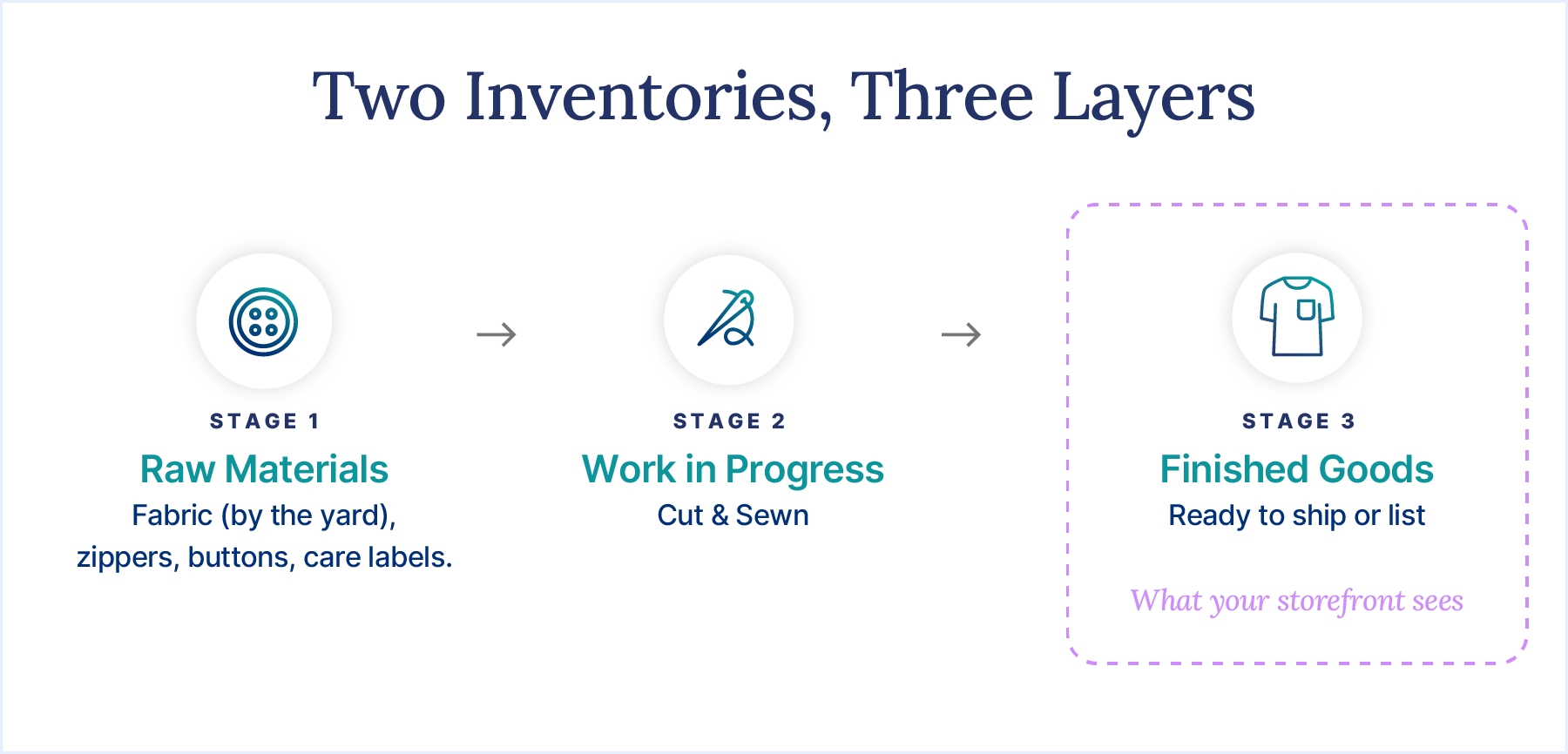
The relationships get tricky. Fabric color maps to garment color, so a navy hoodie pulls navy fleece. Trims like thread or care labels might be shared across every size and color.
Storefront and POS tools only see finished goods. That blind spot causes two expensive mistakes. You oversell styles that aren't sewn yet, or you over-order fabric because you can't see what's already committed.
Contract cut-and-sew adds another layer. Fabric and WIP sitting at a third-party factory still belong to you. If your system can't track stock at a location you don't run, that inventory effectively vanishes until the cartons show up.
Online Growth Brings Channel Chaos, Returns, and Seasonal Whiplash
Every channel you add is one more place your stock can drift out of sync. Amazon, Walmart, Faire, and a wholesale portal each keep their own count unless something connects them. When those counts disagree, you oversell, cancel orders, and annoy the customers you worked hard to win.
Returns pile on. NRF and Happy Returns estimated that 19.3% of online sales across all retail categories would be returned in 2025. Every returned garment has to land back in the right size and color, quickly, so you can sell it again.
Disconnected systems also eat your time. Our 2025 State of Inventory Intelligence survey of 530 inventory professionals found teams lose 16 hours a week syncing disconnected systems. That's two full workdays spent copying numbers!
The Three Types of Systems Apparel Brands Consider (and Who Each Fits)
Most "best software" lists throw POS apps, factory MRPs, and enterprise ERPs into one pile. That's like comparing a sewing machine to a cutting table. Each is built for a different job.
Here's how to tell them apart, plus where an IMS fits in.
Retail POS and E-Commerce Inventory Tools
Retail POS and e-commerce inventory tools are built for stores and storefronts. Think Shopify's built-in inventory, or a point-of-sale (POS) app that runs your checkout.
These tools are great at what they do. They count finished goods, scan barcodes, and record in-store and online sales without fuss. For a shop that buys finished product and resells it, that's often plenty.
The trouble starts when you make things. Many POS tools have no bills of materials (BOMs), the recipe that lists every component in a product, so check before you buy. They don't track raw materials like fabric or trims, and their wholesale features tend to be limited.
Best fit: resellers and boutiques that don't manufacture. A boutique reselling other brands' garments may never need more. If you sew, print, or contract out production, you'll outgrow it quickly.
Manufacturing MRP Software
Manufacturing MRP software is built for the shop floor. MRP stands for material requirements planning: working out which materials you need, and when, to hit your production schedule. Tools like Katana and MRPeasy sit in this category.
MRPs shine at BOMs and production scheduling, plus the work orders (the instructions that tell your team what to make) that follow. If your biggest headache is keeping cutting tables and sewing lines busy, they speak your language.
Apparel exposes the gaps. In our experience, size and color matrices are often an afterthought in this category, so you may end up managing variants one by one. E-commerce and wholesale channels tend to be secondary too, which matters once online sales start growing.
Best fit: makers with heavy in-house production and light channel complexity. If you run a busy factory and sell through one or two channels, an MRP can be a solid choice.
Apparel ERPs vs. an Inventory Management System (IMS)
An apparel ERP is the all-in-one option, and an IMS is the focused one. Which you need depends on how much you want under one roof.
ERP stands for enterprise resource planning. Apparel ERPs, such as AIMS360 or ApparelMagic, cover design and product lifecycle management (PLM), EDI, and financials. EDI, or electronic data interchange, is a standard way for trading partners, like big retailers, to exchange orders, shipping notices, and invoices electronically.
These systems are powerful. Budgets can stretch, too: more than a quarter of organizations exceeded their ERP project budgets.
An inventory management system (IMS) connects inventory, production (BOMs and assembly), purchasing, sales orders, and sales channels. It syncs with the accounting software you already use, such as QuickBooks or Xero. That makes an IMS lighter and faster to adopt.
That's our category. Cin7 is an IMS, sometimes called "ERP Lite" for small business. We're not a full ERP, and we don't try to be one.
Here's a simple rule of thumb:
- If you need full financials, payroll, and PLM in one database, look at an apparel ERP.
- If you need inventory, production, and channels talking while QuickBooks or Xero keeps the books, an IMS is usually the better fit.
Most growing apparel brands land in the second camp.
How the Four System Types Compare
These are general, category-level ratings based on our experience, so individual products will vary.
| System type | Built for | Handles size/color matrix | Tracks raw materials & BOMs | Multichannel + wholesale | Best fit |
|---|---|---|---|---|---|
| POS/e-commerce tool | Stores and storefronts | Partial | Limited | Partial | Resellers and boutiques that don't manufacture |
| MRP | Shop-floor production | Partial | Strong | Limited | Makers with heavy in-house production and few channels |
| Apparel ERP | Company-wide operations | Strong | Strong | Strong | Large, complex operations needing PLM and full financials |
| IMS | Inventory, production, and channels | Strong | Strong | Strong | Growing brands that make products and sell DTC and wholesale |
What to Look for in Apparel Inventory Management Software
Once you know which type fits, the real shopping starts. These five requirements matter most for apparel makers whose online sales are growing. We'll show how Cin7 handles each one, so you have a concrete benchmark for every demo.
Variant Management That Thinks in Styles, Not Just SKUs
Good apparel software thinks in styles first. You should be able to create one style, then add sizes and colors underneath it, instead of building 24 separate products by hand.
In Cin7 Core, we call these product families. A product family groups variations like size, color, and material under one parent style. You can create variations in bulk, and each one gets its own unique SKU.
The view matters as much as the data. Cin7 shows a product family in a List or Matrix view, so you can see stock across every size and color at a glance. Core supports up to three options per family.
Wholesale buyers get a grid too. Our B2B Portal lets buyers place bulk orders using a size and color matrix. Your boutique accounts can order six Small, 12 Medium, and six Large in one go.
Goodbye, spreadsheet order forms!
Bills of Materials That Map Fabric to Finished Garments
This is where apparel inventory management software earns its keep. A BOM lists every component a finished product needs. For apparel, it has to follow your variants, because a navy hoodie and a red hoodie don't use the same fleece.
In Cin7 Core, you can attach one production BOM template to a whole product family. A "Map variations" step links each fabric color to its matching garment color. Components that don't change, like thread or care labels, get set to "All" so they apply to every variant.
Here's how a production run plays out:
- You create a production order for 200 hoodies across sizes and colors.
- The BOM already knows which fabric each color uses and which trims every unit needs.
- When production completes, the components deduct from stock automatically.
You also get visibility into what you can make from what's already on hand. Fabric buying gets a lot less guessy.
Look for multi-level BOMs too. They handle sub-assemblies, such as a printed panel that's made first and then sewn into a garment.
A quick plan check: Standard Assembly Manufacturing, which covers BOMs and assembly, is included on all Cin7 Core plans. Advanced Production Manufacturing isn't available on Standard. It's an add-on on Pro and Advanced.
Real-Time Sync Across DTC, Marketplaces, and Wholesale
Your stock should live in one pool that feeds every channel. When a hoodie sells on Amazon, Shopify and your wholesale portal should update automatically.
Cin7 offers 700+ integrations, including native connections to Shopify, Amazon, Walmart, Faire, WooCommerce, BigCommerce, and eBay. Our B2B Portal (an add-on) pulls from the same stock. Wholesale and DTC (direct-to-consumer) orders draw from one inventory, so you don't sell the same Medium twice.
Channel buffers are the quiet heroes here. A buffer holds back a few units from a specific channel, so a sales spike doesn't leave you overselling. Cin7 Core can push your actual stock minus a buffer to Walmart USA Marketplace, for example.
Why does this matter so much for apparel? A popular drop can sell out fast. If your Shopify count lags behind Amazon's, you'll be writing apology emails all weekend.
Wholesale adds its own rhythm. Boutiques often order early in a season and in bulk, while DTC orders trickle in daily.
One stock pool lets you see both streams side by side. You can decide how much to allocate to each, instead of guessing which spreadsheet is right.
Demand Forecasting Built for Seasons and Size Curves
Forecast at the size and color level, or your forecast will politely mislead you. Style-level numbers hide the Medium that's selling out and the XS that isn't moving.
Look for forecasting that accounts for seasons, your sales history, and how demand differs by SKU. AI can help here, as long as it has enough data to learn from.
Cin7 ForesightAI, available for Core and Omni, predicts demand up to 24 months ahead. It suggests purchase orders and safety stock (the cushion you keep for surprises). It also uses ABC segmentation, which ranks products by how much they matter to your sales.
We recommend at least six months of sales history for useful results. It supports multi-location planning too.
What about outcomes? We report that ForesightAI customers saw a 40% average decrease in overstock.
Forecasting pairs nicely with your BOMs. Once you know how many Mediums you'll need, your BOM tells you what fabric that takes.
Landed Costs, Accounting Sync, and EDI
If you import fabric or finished goods, your real cost per garment includes far more than the factory invoice. That's landed cost: the total price of a product once it has arrived at your door.
Landed costs cover freight, customs, duties, insurance, and currency conversion. You enter those costs, and Cin7 Core allocates them across a purchase by cost, quantity, weight, or volume. A heavy denim order and a light T-shirt order shouldn't share freight evenly, and now they don't have to.
Why bother? Without landed costs, your margins look better on paper than they do in the bank. You might price a jacket for a healthy margin, then discover freight and duty quietly ate into it.
Accounting sync comes next. Cin7 has native integrations with QuickBooks and Xero. Per Cin7 Core's landed cost documentation, COGS (cost of goods sold) journal entries are generated when a sale's shipment is authorized, so your books reflect real product costs.
Finally, there's EDI. If department stores are on your wholesale wish list, expect them to ask for it. Cin7 Omni has built-in EDI connections to major retailers, while Cin7 Core works with EDI partners such as SPS Commerce, Crstl, and Surpass.
Either way, you can say yes when a big retailer asks, "Are you EDI-ready?"
Match the System to Your Business Model
Your business model is the fastest shortcut to a shortlist. Find the description that sounds most like you, then focus your demos on what matters for that model.
If you sell mainly on Shopify or Amazon and produce in small batches, you're a DTC-first maker. You need an IMS with solid BOMs and real-time channel sync. Production scheduling can stay simple, as long as every sale updates every channel and every unit made deducts the right fabric.
If boutiques, Faire, or department stores drive most of your revenue and you're now growing online, you're a wholesale-led brand adding DTC. Look for an IMS with a B2B portal and EDI capability. On Cin7, that means built-in EDI on Omni or EDI partners on Core.
Your priority as a wholesale-led brand is one stock pool. It needs to serve bulk orders and single-unit web sales without either stepping on the other's toes.
If an overseas cut-and-sew partner makes your garments, you're a contract-manufactured brand. Shop-floor scheduling matters less than you'd think. Purchasing, landed costs, and in-transit visibility matter more.
You want to know what's on the water, what it really cost, and when it lands. An IMS with strong purchasing and landed cost tools usually fits well.
If you run a large in-house factory, need PLM for design workflows, or have 100+ users, an apparel ERP may be worth the complexity. You'll invest more time and budget to implement it. At that scale, one database for everything can earn its keep.
Not sure where you land? Plenty of brands blend two models, like a DTC maker that just signed its first department store. Pick the system that fits the model you're growing into.
Put One Real Style Through Every Demo
The best way to judge apparel inventory management software is to make it do your actual job. Generic demos use tidy sample data. Your catalog is messier, and that's exactly why you should bring it.
Choose one real style and ask every vendor to walk it through these seven steps:
- Pick a real style with multiple colors and sizes. A bestseller with at least three colors and a full size run works well.
- Build its BOM. Map fabric by color, and set shared trims like labels and thread to apply across every variant.
- Run a production order. Watch the components deduct from stock when production completes, and ask why if they don't.
- Publish to Shopify plus one marketplace. Sell a unit on one channel and confirm stock updates on the other.
- Place a wholesale order in a size grid. See how a boutique buyer would order a full size run in one go.
- Process a return. Confirm it lands back in the right size and color, ready to resell.
- Check landed costs and the accounting sync. Add freight and duty to a purchase, then follow it through to QuickBooks or Xero.
Then ask the questions that never make it into a slide deck:
- How long does implementation typically take for a business like mine?
- Do you work with implementation partners who know apparel?
- Which features I just saw are add-ons or plan-specific?
That last question matters more than you'd think. On our side, ForesightAI and the B2B Portal are add-ons, and our Standard plan doesn't include an RMA (returns) module. We'd rather you know upfront!
How Gumball Poodle Kept Shopify and Faire in Step
Gumball Poodle shows what happens when your channels stay in step. The brand designs statement socks that are manufactured for it. It sells through Shopify retail and wholesale, Faire, and phone and email orders.
That's a lot of order streams for a team of eight. Then the pressure spiked: the company's previous software was discontinued, leaving only months to find a replacement. No pressure, right?
Gumball Poodle chose Cin7 and implemented it with partner Woodard Consulting. According to its case study, Cin7 now keeps the brand's Shopify and Faire inventory updated in real time.
The founder says the team has been "very consistent at carrying the correct amount of inventory" after 18 months on Cin7, as of the brand's 2024 case study. That's a self-reported outcome, and it's exactly the kind of steady result growing brands want.
The team also leans on reporting. It uses ABC analysis, sell-through, and sales velocity reports to keep a close eye on what's moving.
Socks or sweatshirts, the lesson holds. When every channel reads from one source of truth, you spend less time reconciling counts and more time designing the next collection.
The Cost of Waiting Until Peak Season
The worst time to switch systems is right before your busiest season. Changing inventory software mid-season is like changing a tire on the highway. It's technically possible, but nobody enjoys it.
Waiting has a running cost too. Our 2025 State of Inventory Intelligence research found inventory teams lose 16 hours a week syncing disconnected systems. Every month you wait, those hours keep piling up, along with the oversells and canceled orders that mismatched counts create.
Peak season makes it worse. More orders mean more chances for counts to drift. Holiday returns also land right when you're planning the next drop.
The smarter move is to implement in your off-season. Start with one channel and one collection, get your product families and BOMs right, then expand from there. By the time peak season hits, your system will know your catalog inside out.
How Cin7 Helps Apparel Makers Scale Online
Cin7 is an IMS built to connect what you make with where you sell. For apparel makers growing online, that includes:
- Product families that group sizes, colors, and materials under one style, with a matrix view
- Production BOMs that map fabric color to garment color and deduct components when production completes
- Purchasing with landed costs, so your margins reflect what you really paid
- 700+ integrations, including Shopify, Amazon, Walmart, Faire, QuickBooks, and Xero
- A B2B Portal (add-on) with size-grid ordering for wholesale buyers
- ForesightAI (add-on) for AI-powered demand forecasting up to 24 months ahead
- EDI built into Omni, or available through EDI partners on Core
Choose a plan that matches your production depth. Standard covers BOMs and assembly, while Pro and Advanced can add Advanced Production Manufacturing.
Not sure which fits? We'll help you figure it out.
Ready to put your own style through its paces? Bring your trickiest hoodie, and we'll walk it from fabric to Shopify listing together. Get a demo!
Frequently Asked Questions
What Is the Best Inventory Software for Clothing Manufacturers?
The best inventory software for clothing manufacturers depends on your business model. DTC-first makers usually need an IMS with BOMs and channel sync.
Wholesale-led brands need B2B ordering and EDI. Large factories with PLM needs may justify an apparel ERP. See the business model section above for your shortlist.
What's the Difference Between Inventory Software and an Apparel ERP?
Inventory software (an IMS) runs inventory, production, purchasing, and channels, then syncs with your accounting tool. An apparel ERP aims to run everything, including financials, payroll, and PLM, in one database. A handy test: do you want to replace QuickBooks or Xero, or keep them?
Can Inventory Software Track Fabric and Finished Garments at the Same Time?
Yes, if it supports bills of materials. When you complete production, the BOM deducts fabric and trims and adds finished goods. Look for work in progress (WIP) tracking too, so you can see garments that are cut or at a contractor but not finished yet.
Does Apparel Inventory Software Work With QuickBooks?
Many options do, and Cin7 has native integrations with both QuickBooks and Xero. Per Cin7 Core's documentation, cost of goods sold (COGS) journal entries are generated when a sale's shipment is authorized. That keeps product costs aligned between your inventory and your books.
Is Free Clothing Inventory Software Enough?
Free clothing inventory software can be enough for a reseller with a few dozen SKUs and one sales channel. It usually breaks once you manufacture, because free tools rarely handle BOMs or raw materials. Add a second channel or wholesale accounts, and manual syncing creeps in fast.
When Should an Apparel Brand Move Off Shopify's Built-In Inventory?
Move off Shopify's built-in inventory when you hit one of four triggers. You start manufacturing and need to track fabric and trims.
You add wholesale accounts. You launch a second sales channel, like Amazon or Faire. Or you hold stock in multiple locations, including a contractor's factory or a 3PL warehouse.