









No inventory management strategy is one-size-fits-all. Different products require unique specifications, and you have to account for all of them in your inventory management process.
With all this variance, inventory management can get seriously time-consuming if you're constantly hunting for ways to track changing product information.
The solution? A customizable inventory list template that captures all the information you need to record for a product. With one in hand, you can easily update your numbers, see all your products in one place, and pull insights straight from your spreadsheet. Think of the templates below as inventory spreadsheet examples you can copy, customize, and put to work today, all free to download.
Key Takeaways
- An inventory list template is a spreadsheet that keeps product details like name, SKU, quantity, price, reorder level, and inventory value in one organized place.
- The four most useful formats are simple, retail, manufacturing, and wholesale, and each one adds a few fields for its use case.
- You can build your own in Excel or Google Sheets in five quick steps, or just download one of our free inventory spreadsheet examples and start filling it in.
- Spreadsheets are great when you're small, but automated software like Cin7 takes over the manual updates once your catalog and channels start to grow.
As a small business owner, you need a template that accounts for the nuances of your market, like seasonality, supply chain variance, and more. That's why it helps to find a template catered to your specific industry. For the bigger picture, our inventory management guide for small businesses makes a great companion read. Below, you can explore and download the following inventory list templates:
- Simple inventory list template
- Retail inventory list template
- Manufacturing inventory list template
- Wholesale inventory list template
Later on, we'll explain what all templates should include, how you can create one for your business, and the benefits of automating your inventory management process.
1. Simple Inventory List Template
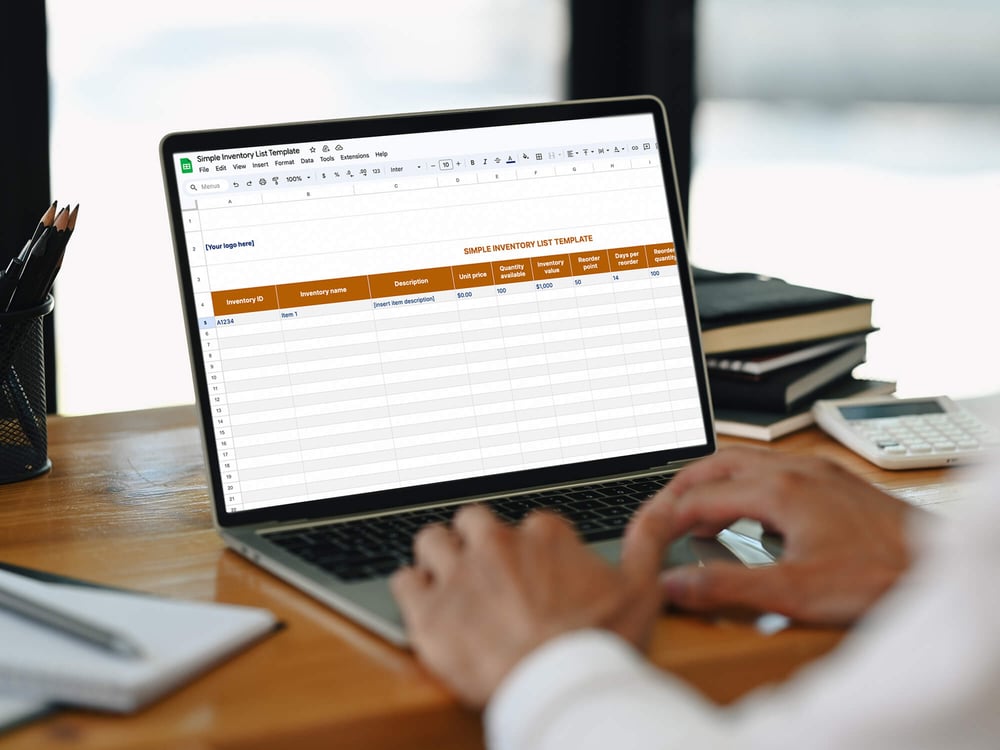
In its simplest form, an inventory list includes basic product information like price, description, and quantity.
Product sellers dealing with only a few products can lean on a simple inventory list, but may need to pivot to a more complex template once inventory needs get more involved. Download the template below to get started.
Download spreadsheet:
PDF | Excel | Google Sheets
2. Retail Inventory List Template
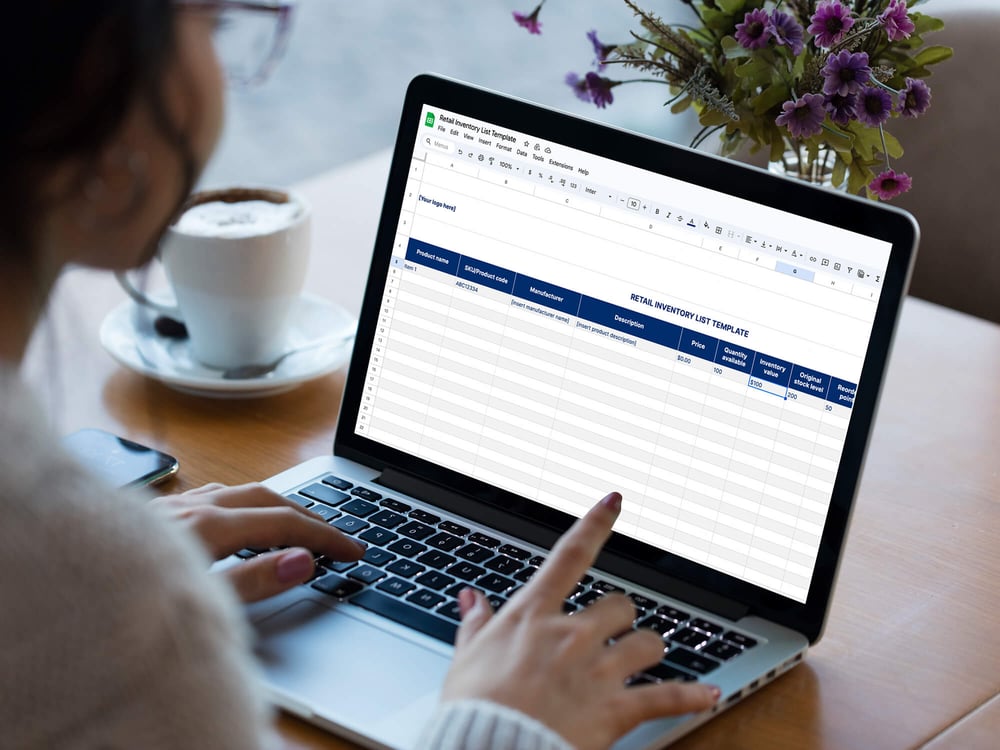
Retail inventory management templates can look a lot like simple inventory templates, but they should track a few more components like:
- SKU or product code for tracking similar products
- Manufacturer for tracking different supplier information
- Days per reorder to track how long reorders take for specific products
Once you're selling more products regularly, it's pivotal to know what your turnaround times look like. Include days per reorder in your primary inventory list so you can reorder in advance and never run out of stock. For more ways to keep your counts on point, see our guide on how to improve inventory accuracy.
Download spreadsheet:
PDF | Excel | Google Sheets
3. Manufacturing Inventory List Template
For manufacturers, tracking inventory brings its own set of challenges, because you have to track four different categories of inventory:
- Raw materials or assembly parts: Resources used to manufacture goods
- Work-in-progress (WIP) inventory: Inventory that's either assembled or sold
- Finished goods: Products that have gone through the manufacturing process
- Material, repair, and operations inventory (MRO): Inventory used in the production process but not seen in the end product
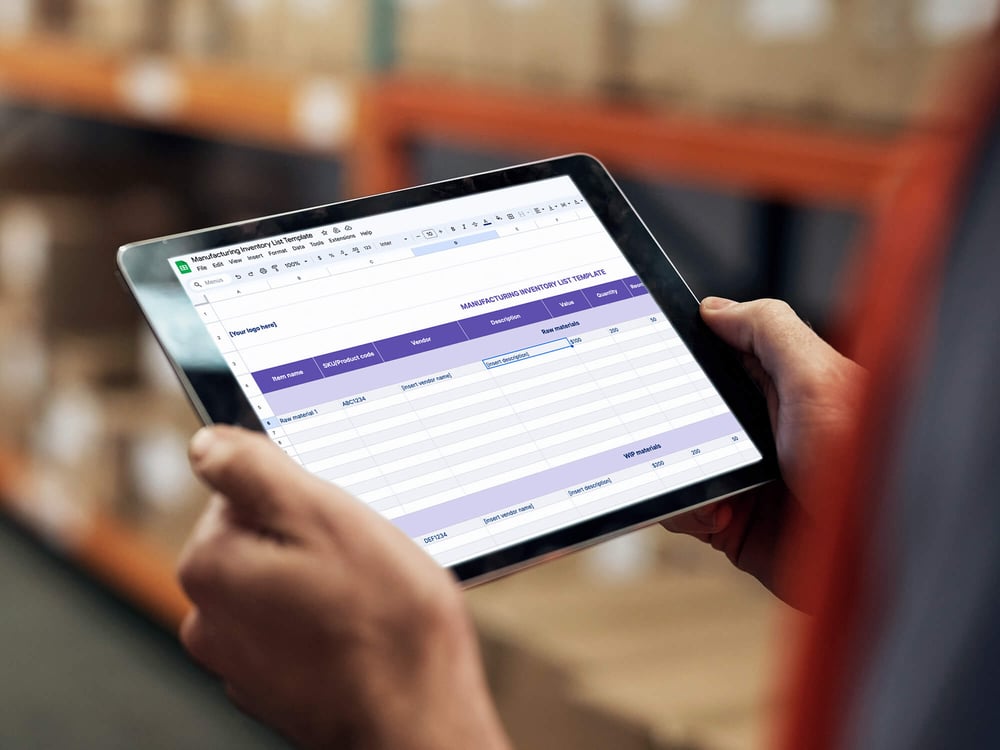
Accurately tracking manufacturing inventory is especially important, since miscues can lead to bigger supply chain repercussions, slower manufacturing lead times, and fractured customer relationships. Manufacturers also track lead time to understand how long it'll take to get specific products to customers.
Manufacturers track roughly the same product information as retailers, but batch goods into four different categories, as seen below:
Download spreadsheets
PDF | Excel | Google Sheets
4. Wholesale Inventory List Template
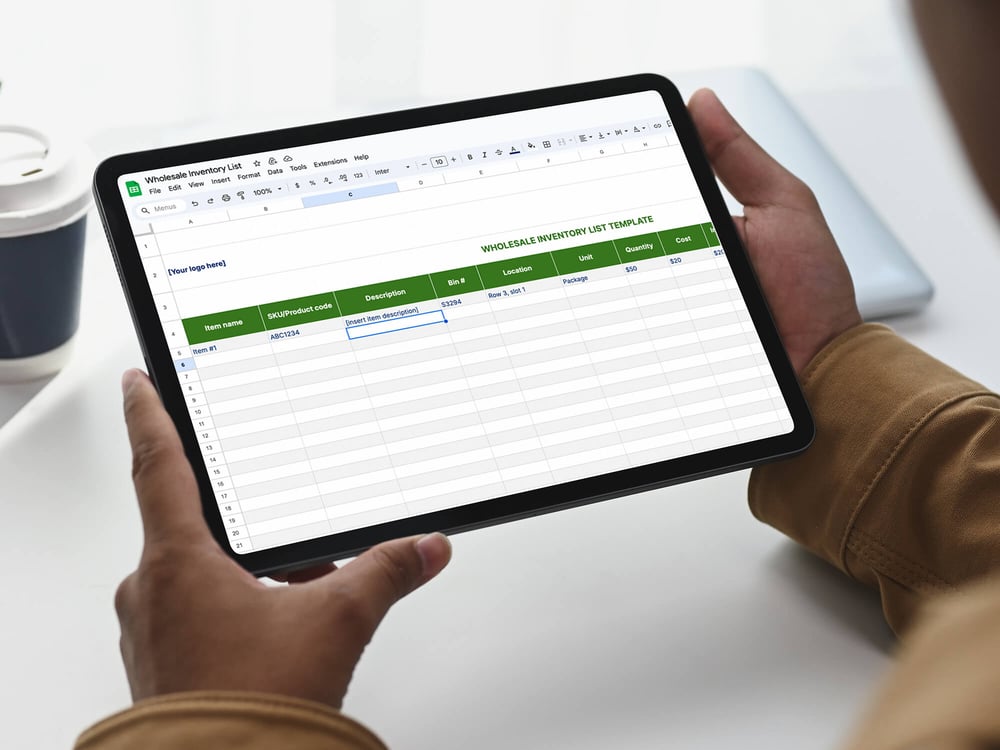
Wholesale inventory list templates need to account for the warehouses and large volumes of inventory that wholesalers deal with, so nothing slips through the cracks. As a result, wholesale inventory lists also track:
- Bin number: The bin the product is located in
- Location in the warehouse: Precisely where the bin is located
- Unit: How the product is tracked (individual unit, box, package, etc.)
Being as specific as possible is key when you're accounting for location. Our template drills all the way down to the exact row and slot a product sits in.
Download spreadsheet:
PDF | Excel | Google Sheets
What Does an Inventory Spreadsheet Example Look Like?
Sometimes it's easier to see the finished thing than to describe it. Here's a simple inventory spreadsheet example, a sample inventory list with a few rows filled in, so you know exactly what to aim for when you set up your own.
| Item | SKU | Description | Quantity | Reorder Level | Unit Price | Inventory Value |
|---|---|---|---|---|---|---|
| Ceramic Mug | MUG-001 | 12oz matte white mug | 240 | 50 | $4.25 | $1,020.00 |
| Cotton T-Shirt | TEE-BLK-M | Black crew neck, medium | 85 | 40 | $7.10 | $603.50 |
| Scented Candle | CND-LAV-8 | 8oz lavender soy candle | 36 | 60 | $9.50 | $342.00 |
| Water Bottle | BTL-STL-20 | 20oz stainless steel bottle | 150 | 45 | $11.75 | $1,762.50 |
| Notebook | NB-A5-DOT | A5 dot-grid notebook | 310 | 75 | $3.60 | $1,116.00 |
Notice how one glance tells you what's healthy and what needs attention. The scented candle is already below its reorder level, so it's time to restock before you sell out. That's the whole point of a good inventory spreadsheet: your numbers do the talking.
What Is an Inventory List Template?
An inventory list template is an organized spreadsheet that helps businesses track and manage stock, with all of your product information living in one place. While the exact columns vary by industry, some universal elements include:
- Item name
- Item description
- Item size
- Price
- Quantity in stock
- Reorder level
- Reorder time
- Inventory value
With all this information in one place, it's easier to quickly see:
- How much product you have in stock
- What you need to reorder
- How long it'll take to get more stock
- Which products perform well and which don't
How Do You Customize an Inventory Template?
You customize an inventory template by adding, removing, and renaming columns until it matches how your business actually runs. Whether you're working from a printable inventory form or a live spreadsheet, start with the essentials, then tailor from there.
Begin by identifying the columns your inventory sheet truly needs, such as categories for materials, item counts, reorder thresholds, and supplier details. These foundational elements let you streamline data tracking while avoiding unnecessary clutter.
For instance, project-focused businesses may benefit from columns that separate tools and equipment by project phase. Keeping records updated is critical, so enter information promptly and align your updates with real-time inventory changes. With a customized template, your inventory management becomes more organized and a lot more actionable.
What Should an Inventory List Include?
A good inventory list should include seven core fields: item name, SKU, description, quantity in stock, reorder level, unit price, and inventory value. Nail those and you've got a solid foundation.
- Item name: The plain-language name you use to identify the product.
- SKU: The unique code that keeps similar products from getting mixed up.
- Description: A few details, like size, color, or variant, that pin down which item it is.
- Quantity in stock: How many units you have on hand right now.
- Reorder level: The threshold that tells you it's time to restock.
- Unit price: What each item costs or sells for, so you can value your stock.
- Inventory value: Quantity multiplied by unit price, showing what that stock is worth.
From there, using industry-specific inventory templates, whether in Excel or Google Sheets, lets you centralize the key details in one place. This structured approach highlights patterns and makes reporting far more accurate for your inventory management system. A clear, systematic inventory fill list is the foundation for making informed business decisions and improving operational efficiency, and it pairs well with proven inventory management techniques.
How to Create an Inventory Spreadsheet
If you'd rather build an inventory spreadsheet yourself, you can do it in a few simple steps. Here's how:
1. Open a Spreadsheet and Add Your Company Branding
All you need to create an inventory list template is a spreadsheet. You can build one in Google Sheets or Excel, or expedite the whole thing with a template like ours.
Create some unity and consistency across verticals by adding your company's branding to the spreadsheet. This list will serve as your single source of truth, so it's worth making it feel like yours.
2. Add Your Categories
Next, add your columns or categories. This is the information you'll need to track and update regularly, like available quantity, item description, price, reorder time, and so on.
If you're starting from scratch, a pre-built template is a big help, so you know you're not leaving any columns out.
3. Fill in Your Product Information
Once your structure is in place, fill it in with current product information. Take this step slowly and carefully. Every detail needs to be accurate when you're filling out your spreadsheet.
4. Name and Save Your File
After you've filled out your spreadsheet, name and save it. Call it something specific and relevant. You'll be opening it often, so pick a name you'll actually be able to find.
5. Update It Regularly
The job's far from over once your spreadsheet exists. The next step is keeping it updated so product information stays accurate. That means:
- Updating quantity after products sell
- Updating quantity after products come back in stock
- Updating price whenever you make changes
- Adding items whenever you get new stock
This can be a real headache for product sellers, especially when you'd rather be spending your time elsewhere.
Automated inventory management handles all of this for you, and it can be a serious timesaver for small businesses moving off spreadsheets.
Avoiding Common Inventory Management Pitfalls
Even with solid tools and templates, a few common pitfalls can trip up your inventory management system. Forgetting to regularly update your inventory sheet often leads to inaccurate reports and costly shortages. Neglecting to track tools and equipment for maintenance or replacement can gum up the works too.
To keep errors and inefficiencies to a minimum, consider automating your inventory processes and brushing up on a few inventory management rules. Automation saves time and reduces human error, so you can manage inventory levels effectively and keep goods and services flowing across your business.
Choosing the Right Inventory Tracking Method: Manual, Spreadsheet, or Automation?
When it comes to inventory tracking, one method doesn't fit everyone. The right system depends on your business size, order volume, team capacity, and how fast you need to scale.
From pen-and-paper to spreadsheets to fully automated platforms, let's break down the three most common ways businesses manage inventory, and why picking the right one matters more than ever.
You're in good company if you're still doing it by hand. Capterra found about 34% of small businesses use manual methods and 24% use spreadsheets. But those methods buckle at scale. Globally, retailers lose an estimated $1.73 trillion a year to inventory distortion, out-of-stocks and overstocks combined, according to IHL Group.
Manual Inventory Tracking
Manual tracking, often using pen and paper or basic offline forms, can work in a business's earliest days. It's simple, inexpensive, and doesn't require any tech setup.
But as your product catalog grows or you start managing inventory across multiple locations, this approach gets error-prone and time-consuming fast.
Ideal for: Micro-businesses or early-stage startups with very limited inventory.
Spreadsheet-Based Inventory Tracking
Spreadsheets are the next logical step up. With tools like Excel or Google Sheets, you can build inventory templates (or download ours!) and create formulas to calculate reorder levels, stock value, or sales velocity.
Spreadsheets are flexible, customizable, and relatively easy to manage, as long as you're staying on top of updates manually.
But that's the catch: manual updates. Without automation, errors creep in fast. Forget to update stock levels after a sale or a delivery, and you're suddenly dealing with overselling, shortages, or frustrated customers.
Ideal for: Small businesses with limited SKUs and one or two team members managing inventory.
Automated Inventory Management Software
This is where scaling businesses thrive. Automated inventory management software connects your sales channels, warehouse operations, and purchasing in real time, with no manual updates and no clunky workarounds.
Cin7 Core is an all-in-one inventory solution built for growing brands. It tracks stock levels in real time, syncs with e-commerce platforms, automates reorders, and delivers powerful reporting, all from one centralized platform. If you sell online, our take on e-commerce inventory management is a helpful next read.
Why it works:
- Avoids stockouts with automatic reorder points
- Reduces human error through real-time data sync
- Saves time and manual labor
- Integrates with your accounting tools and sales channels
- Scales with your business as complexity grows
Ideal for: Growing or multi-channel businesses that need real-time visibility and want to leave spreadsheet maintenance behind. If you're juggling several sales channels, our guide to multichannel inventory management challenges is worth a look.
Inventory Tracking Methods Comparison Table
| Method | Pros | Cons | Best For |
|---|---|---|---|
| Manual (Pen & Paper) | No tech required; low upfront cost | High risk of errors; time-consuming; not scalable | Micro businesses or hobbyists |
| Spreadsheets | Flexible and customizable; low-cost solution | Manual updates; easy to break; limited visibility | Small teams with basic workflows |
| Cin7 Core (Automated) | Real-time tracking; auto-reordering; scalable and connected | Higher initial setup; mild learning curve | Scaling, multi-channel brands |
Benefits of Automating Your Inventory List
The major shortcoming of spreadsheet templates is that they can't grow the way your business does. As you gain customers and increase sales, the time you spend updating spreadsheets grows too, time you should be spending on growing your business.
Here's the part that really stings: syncing siloed inventory data across disconnected systems costs businesses roughly 16 hours a week and a whopping $21,632 a year for each entry-level employee doing the job, according to Cin7's State of Inventory Intelligence research. That's a lot to spend on data entry.
On top of that, as business takes off, more processes enter the picture and everything gets more complex. You'll need to think about warehouse management, supply chain optimization, and how you'll scale.
With all that on your plate, you won't have time to hand-update a spreadsheet, and honestly, your time is better spent elsewhere. Opting for automated inventory management software like Cin7 lets you connect all your processes in a single source of truth built to grow and scale with your business.
We've seen this play out. Before Cin7, Australian salon-supply importer and distributor HairCo ran painful manual stocktakes, and inventory was never accurate. After switching to Cin7 and a rolling stock take, GM Dion Alessi saved up to 16 hours of counting time, and picking and packing errors dropped from 3% to 0.5%.
With an automated system, you can:
- Save time: With automation, you won't have to spend time manually updating your spreadsheets.
- Optimize inventory turnover ratio: A comprehensive solution sets reorder points for you so you can hit a good inventory turnover ratio.
- Provide better demand forecasting: Software solutions include built-in demand planning and inventory forecasting capabilities so you're always ahead of the curve.
- Improve accuracy: When you manually update your inventory, you're wide open to human error that can throw your data off track.
- Enhance growth: Inventory management software scales with your business.
Enhancing the Value of Your Inventory List
Before we talk automation, it's worth saying: a good template earns its keep all on its own. It keeps your data organized, brings consistency to how every product is recorded, and gets you up and running fast, all of which cut down on the little errors that snowball into big ones.
An optimized inventory list doesn't just track stock, it informs strategic decisions. Comprehensive templates that include product details, purchase orders, and equipment inventory data help you spot trends and sales patterns.
Organized columns on your inventory sheet make detailed analysis possible, giving you a clearer picture of stock value and growth opportunities. Regular updates, paired with the right inventory management platforms, keep your business competitive and ready for whatever the market throws at you.
Frequently Asked Questions
Still wondering how to get started with your inventory list? We've got you covered. Here are a few common questions and answers about creating a comprehensive inventory list.
How Do I Make a Simple Inventory List?
You can make a simple inventory list by opening a spreadsheet, listing your products and the relevant categories about them, and then filling in those categories with product information.
Once you create this spreadsheet, you'll update it as product information changes.
How Do You Make a Good Inventory Spreadsheet?
The best inventory spreadsheets stay consistently updated, track all the pertinent categories, and are well-organized.
Make sure you're using a platform your team is comfortable and familiar with. Excel and Google Sheets are both effective choices when it comes to building an inventory list.
Can Google Sheets Be Used for Inventory?
You can use Google Sheets for inventory lists the same way you'd use Excel. If your team already uses Google Workspace, Google Sheets is an effective way to make sure everyone has access to the inventory list.
Is There a Free Inventory Sheet Template?
Yes. You'll find four free inventory sheet templates right at the top of this article, covering simple, retail, manufacturing, and wholesale needs. Each one comes in PDF, Excel, and Google Sheets formats, so you can download the version that fits your workflow and start filling it in today.
Can I Use Excel to Keep Track of Inventory?
Absolutely. Excel is a popular choice for tracking inventory because you can build custom columns and formulas to calculate reorder levels, stock value, and sales velocity. Just keep in mind that Excel relies on manual updates, so it works best when you have a smaller catalog and someone staying on top of the numbers.
What Should an Inventory Spreadsheet Include?
A good inventory spreadsheet should include item name, SKU, description, quantity in stock, reorder level, unit price, and inventory value. Depending on your business, you might also add supplier details, warehouse location, or reorder time. The goal is to capture enough detail to know exactly what you have and what you need to reorder at a glance.
What Is a Simple Way to Track Inventory?
The simplest way to track inventory is a spreadsheet template like the ones above, where you log each product and update quantities as items sell or arrive. It's low-cost and easy to start. Once manual updates start eating your time, that's your cue to move to automated software that syncs the numbers for you.
What Is the 80/20 Rule in Inventory?
The 80/20 rule, also called the Pareto principle, suggests that roughly 80% of your sales come from about 20% of your products. In inventory management, it's a reminder to keep your best-selling items well-stocked and closely tracked, since they drive most of your revenue. Flagging those top performers in your inventory list helps you prioritize reorders where they matter most.
What Is an Inventory List?
An inventory list is a record of everything your business has in stock. For each item, it captures the key details, like name, SKU, quantity, and value, so you always know what you have on hand. That clarity makes it easy to see what's running low and what you need to reorder.
What's the Difference Between an Inventory List and an Inventory Spreadsheet?
The inventory list is the information itself, the records of what you have in stock. The spreadsheet is just one way to store that list, usually in Excel or Google Sheets. Once spreadsheets start to feel unwieldy, you can keep the same list in dedicated software instead.
Why Is an Inventory List Important?
An inventory list tells you what's in stock, what to reorder, and what to scale back on. That visibility helps you prevent stockouts and overselling before they cost you a sale. In short, it gives you the numbers you need to make better decisions.
What's the Best Tool for Managing Inventory Lists?
Spreadsheets work perfectly well when you're small and your catalog is easy to eyeball. Once you're juggling more SKUs and sales channels, automated inventory software like Cin7 keeps your counts accurate in real time, with no manual updates. The right tool really comes down to how much complexity you're managing.
Does Word Have an Inventory Template?
Yes, you can build a basic inventory table in Word, and it'll do the job for a short, simple list. That said, Word is weaker at calculations than Excel or Google Sheets. If you need reorder math or running totals, a spreadsheet or dedicated software is the better call.
Automate Inventory Lists with Cin7
Keeping a spreadsheet for inventory can work in the early stages of your business, but it's not a scalable strategy.
Inventory management can quickly become an overwhelming, complicated task. Instead of editing and updating spreadsheets, explore a system that does all of it for you, and more.
Cin7 uses Connected Inventory Performance to help small businesses grow with ease. With an advanced suite of features and a serious emphasis on automation, Cin7 takes the legwork out of inventory management so you can focus on building your business.
Start a free trial today to learn more.
More from the blog
View All Posts
When to Upgrade to Inventory Management Software: Signs You've Outgrown Spreadsheets
Read More
What Is an Inventory Cycle Count (and How Do You Apply It)?
Read More