








Effective inventory management tools are essential for a company to meet customer demand, maintain healthy cash flow, and scale efficiently.
Yet, many small and medium-sized enterprises today still rely on outdated, error-prone, and fragmented inventory management systems, which make it difficult to track stock accurately, control costs, fulfill orders on time, and adapt quickly to changing customer demands.
These challenges can harm your profit margins, reduce customer satisfaction, and hinder business growth. In fact, inventory distortions, which refer to the financial costs caused by having stock levels that are either too high or too low, are estimated to cost global businesses $1.7 trillion annually1.
Because technology has evolved rapidly, modern SMBs now have access to powerful, easy-to-use inventory management software that brings automation, real-time visibility, and insight-driven decision-making to their operations. By leveraging these inventory management tools, businesses can increase efficiency and reduce costs. Among many other capabilities, these tools eliminate manual processes, enhance forecasting, and enable businesses to scale with confidence.
Inventory management tools are a core component of broader inventory management strategies, helping teams unify systems and maintain control across every sales channel. Comprehensive inventory control is crucial for optimizing business operations. Below, we’ll explore the types of tools available today, key features to look for, and how they fuel long-term growth.
Why Modern Businesses Need the Right Inventory Tools
Many SMBs begin their operations with simple methods for tracking inventory, such as spreadsheets and paper logs. However, as operations expand, these methods become bottlenecks that create inefficiency and risk.
Common limitations include:
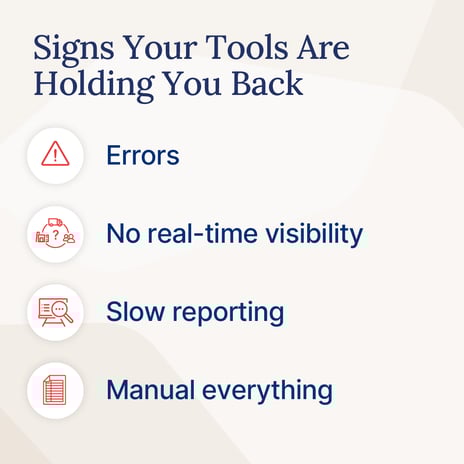
- Proneness to human error: Traditional methods rely on manual data entry, which is prone to errors. Common issues include miskeyed numbers, missed or duplicate entries, and incorrect product codes. These errors cause discrepancies between available stock and what’s listed online, disrupt fulfillment, and produce inaccurate reports.
- Lack of real-time visibility: Spreadsheets and logs are typically updated periodically, rather than in real-time. Because you can’t see what’s happening right now, you might sell products that are already out of stock—leading to cancellations and unhappy customers.
- Inefficiency and wasted time: Manual tracking requires constant staff input. Employees spend hours counting and updating data, instead of focusing on high-value activities such as marketing or customer experience.
- Limited reporting and insights: Old-school systems store raw data without offering trend analysis or predictive insights. As a result, teams spend more time compiling reports and less time acting on opportunities.
- Poor integration with other systems: Paper and spreadsheet methods don’t connect easily with accounting, fulfillment, or e-commerce platforms, which causes data silos and slows decision-making.
How Modern Inventory Management Tools Help: Key Features
Modern inventory management software is designed to automate and optimize inventory processes. They use technology (including both hardware and software components) to make the process of inventory management faster, easier, and more accurate.
Some of the most notable features of these systems are as follows:
Real-Time Inventory Tracking
Real-time tracking automatically updates stock levels whenever items are sold, received, or moved. Because this data refreshes instantly, businesses avoid overselling and can make smarter restocking decisions.
Automation of Routine Workflows
Automation eliminates manual work in repetitive tasks such as reordering or updating stock quantities. For instance, when an item falls below a set threshold, the system automatically generates and sends a purchase order to suppliers. This ensures popular products are always available without constant monitoring.
Barcode and QR Code Scanning
Barcode and QR code scanning features enable quick and easy recording of product movements. Instead of manually typing product details, employees simply scan items—reducing errors and accelerating warehouse operations.
Multi-Location Management
Because growing businesses often operate across multiple warehouses or channels, multi-location management enables tracking inventory from a single dashboard. This unified view improves transfer efficiency and fulfillment accuracy.
Integration with Other Systems
Modern systems integrate seamlessly with e-commerce, accounting, and supplier software. The synchronization of integrated inventory management prevents data duplication, streamlines order processing, and keeps every department aligned. For example, connecting with accounting systems ensures stock updates are reflected automatically in financial reports.
Reporting and Analytics
Built-in reporting and analytics transform raw data into actionable insights. Teams can identify best-selling products, slow movers, and peak sales periods to fine-tune purchasing and pricing strategies.
Mobile Access
Mobile access allows teams to manage inventory from anywhere using a phone or tablet. Because visibility isn’t tied to a desktop, leaders can make informed decisions on the go—boosting responsiveness and productivity.
Demand Forecasting
Advanced systems use AI and machine learning to forecast future demand. By analyzing sales trends, seasonal shifts, and promotions, these tools enable businesses to maintain optimal stock levels while minimizing excess inventory.
Types of Modern Inventory Management Tools: Specialized Tools vs. All-in-One Solutions
When choosing an inventory management system, businesses typically have two options: standalone inventory software or integrated solutions, such as Enterprise Resource Planning (ERP) platforms. The choice between these will impact how you manage inventory and related processes. Each type has its own strengths and limitations.
Standalone Inventory Management Solutions
A standalone inventory management system is a dedicated software tool designed specifically to manage inventory. It focuses solely on inventory-related tasks such as tracking product quantities and movements, recording purchases and sales, generating inventory reports, and managing orders.
These systems operate independently of other business systems.
Advantages
- Simplicity: Easy to understand and use, with minimal setup required.
- Lower cost: More affordable than full ERP systems, which makes them suitable for small businesses.
- Quick implementation: Can be installed and operational within days or weeks.
- Focused functionality: Designed specifically for inventory tasks, without unnecessary features.
Disadvantages:
- Data silos: Standalone systems operate in isolation, resulting in fragmented information across departments. Unlike integrated ERP systems, they don’t provide a unified view of business operations.
- Integration hurdles: Connecting a standalone IMS to other essential software, such as accounting, ecommerce, or CRM platforms, often requires additional setup, third-party tools, and significant technical expertise.
Standalone inventory management solutions are best for:
- Companies with straightforward inventory processes, low transaction volumes, and a need for fast deployment with lower upfront costs.
- Businesses that prioritize focused inventory functionality over full organizational integration.
ERP Systems
An ERP system is a comprehensive platform that integrates inventory management with multiple other business functions, including accounting, sales, human resources, procurement, and manufacturing. Inventory data within an ERP flows automatically across the organization, creating a centralized, real-time “single source of truth.”
Advantages
- Centralized data: Inventory information is automatically synced with other business areas, reducing the likelihood of errors that can occur with manual transfers.
- Better organizational collaboration: Departments like finance, operations, and sales share the same data in real time, improving efficiency and decision-making.
- Scalable infrastructure: ERPs can support complex supply chains and multi-entity operations as the business grows. Standalone solutions often struggle with complexity and scaling.
Disadvantages
- Higher cost and complexity: ERP implementation is expensive, time-consuming, and often requires comprehensive staff training.
- Longer deployment: Implementing full ERP systems can take months to complete properly.
- Less specialized inventory features: Some ERPs may offer less advanced inventory-specific tools compared with dedicated standalone solutions.
ERP solutions are best for:
- Companies that need seamless integration across inventory, accounting, sales, procurement, and other business functions.
- Organizations are seeking a single, centralized platform to manage all aspects of operations.
How to Compare and Choose the Right Inventory Management Tools
Choosing the right inventory management system can be overwhelming due to the numerous options available in the market.
The key to making a good choice is to first evaluate your business needs, resources, and growth plans.
Below is a step-by-step guide to help you compare and select the right system.
Assess Your Business Size and Complexity
Start by considering the size of your business and the complexity of your operations.
Small businesses with a limited product range, a single location, or a straightforward inventory process often do not need the extensive functionality of an ERP system. A dedicated, standalone inventory management system can efficiently handle their needs, without adding unnecessary complexity or cost.
On the other hand, larger companies or businesses with multiple locations, high transaction volumes, or complex supply chains have more demanding requirements. They need a system that can coordinate inventory across warehouses, integrate with sales and accounting systems, manage large volumes of orders, and support multi-channel operations. Integrated ERP solutions are better suited to these scenarios.
Define Your Goals
Clarify what you aim to achieve with an inventory management tool. Common goals include improving accuracy, saving time, enhancing reporting, or planning for growth. Defining your objectives upfront will help you avoid paying for features that don’t contribute to your priorities. Clearly defined goals also provide benchmarks to evaluate system performance after implementation.
Determine Your Budget
Inventory management tools vary in cost, including upfront fees, subscription plans, training, and maintenance. Set a budget that strikes a balance between affordability and the level of support and functionality you require. Remember to consider the long-term costs of inventory management systems, not just the initial pricing.
Evaluate Integration Capabilities
Consider whether the system can connect with your existing business tools, such as accounting software, sales platforms, or supply chain management tools. Integration as we have seen, reduces manual data entry, keeps information consistent across systems, and helps smoothen operations.
Consider Scalability
Choose a system that can grow with your business. Specifically, look for solutions that can handle an expanding product range, additional sales channels, multiple locations, and increasing order volumes without requiring expensive upgrades or a complete overhaul.
Check Vendor Support and Reliability
Reliable customer support is critical when implementing and using an inventory management system. Evaluate the vendor’s reputation for service, response times, and availability of support channels, such as phone, email, or live chat.
Additionally, check for resources like user guides, tutorials, and online communities. A vendor that offers strong support can help you troubleshoot issues quickly, minimize downtime, and make sure you get the most out of the system.
Check Security and Compliance
Inventory data often includes sensitive financial, operational, and supplier information that must be protected. Ensure the system you select offers robust security measures, including multi-level access controls, encryption, two-factor authentication, and automatic backups.
Additionally, verify that it supports compliance with industry regulations relevant to your business, such as ISO standards, FDA regulations, or GDPR. A secure, compliant system reduces the risk of data breaches, protects your company’s reputation, and builds trust with partners and stakeholders.
Seek Recommendations and Reviews
Insights from other businesses can be invaluable when evaluating inventory systems. Look for user reviews, case studies, and peer recommendations within your industry to understand how a system performs in real-world conditions. These sources can highlight hidden costs, integration challenges, or limitations not obvious in vendor marketing.
Test the System Before Committing
Whenever possible, take advantage of demos, free trials, or pilot programs before making a purchase. Testing the system enables you to assess how well it aligns with your specific workflows and identify potential areas for improvement. Encourage your team to interact with the system during the trial and provide feedback on usability, speed, and overall functionality. Use the results to make an informed, well-rounded decision.
Wrapping Up: Simplify, Scale, and Succeed with Cin7
The right inventory management software provides full visibility into your inventory, helps prevent costly issues such as overstocking or stockouts, and offers actionable insights that support smarter, faster decision-making.
Cin7’s all-in-one platform combines the power of automation, real-time tracking, and integrated analytics to help you scale confidently. With features such as real-time tracking, automated replenishment, multi-channel integration, and powerful analytics, Cin7 enables you to manage your inventory efficiently and make data-driven decisions that fuel growth.
Request a free demo of Cin7 today to see how it can support your business.
Sources:
IHL Group. “Fixing Inventory Distortion: Are We There Yet?” IHL Services, https://www.ihlservices.com/product/fixing-inventory-distortion-are-we-there-yet/.
More from the blog
View All Posts
Complete Guide to Inventory Management: Types, Efficiency and More
Read More
Top E-Commerce Inventory Management Techniques and Optimizing Inventory Control With Cin7
Read More
